
Before you start
- You need Add on Invoices, Can see selling prices and View on Quotations.
- The Bill from Quotation module is on for your company. It is off by default for Design & Consultation firms. See Switch a module on or off.
- The project has an awarded quotation with lines. See Accept or reject a quotation.
Steps
-
Start a Project invoice and choose the project. See Create an invoice.
-
Select Bill from quotation [number]. There is one button for each awarded quotation of the project. "Bill from quotation [number]" opens.
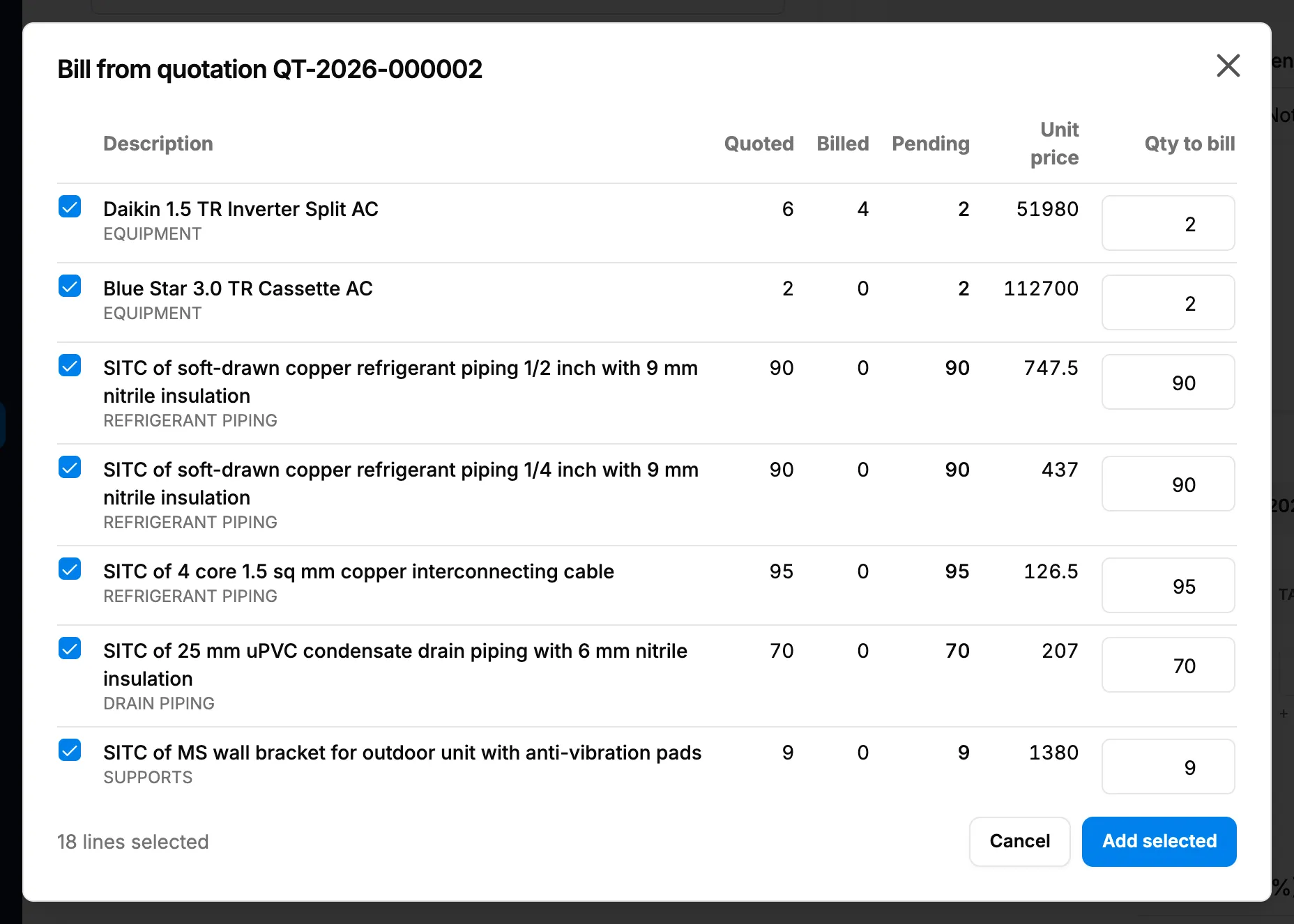
Step 2. Bill from quotation with Quoted, Billed, Pending and Qty to bill on each line. -
Read each line: Description, Quoted, Billed, Pending and Unit price. Fully billed lines are not listed.
-
Every pending line starts ticked, and the box shows "[number] lines selected", for example "18 lines selected". Untick the lines you do not want to bill now.
-
In Qty to bill, enter how much of each line to bill now.
-
Select Add selected.
-
If a quantity is above what is pending, "Bill more than the pending quantity?" asks: "One or more selected lines have a quantity greater than what's pending on the quotation. This is allowed (e.g. approved extras) but will over-bill those lines. Continue?" Select Bill anyway, or Review to change the quantities.
-
Check the new lines on the invoice, then save it.
Result
The message "Added [number] line(s) from [quotation number]." shows, and the lines are on the invoice. Each line remembers the quotation line it bills, so the quotation's Billing tab counts it as billed. Lines billed above the quote show "over-billing" in the box and "over-billed" on the Billing tab. See Read a quotation's Billing tab.
The invoice is still a Draft. Next: Issue an invoice.
If something is different
- No Bill from quotation button: the invoice is not a Project invoice, the project has no awarded quotation, you do not have View on Quotations, or the Bill from Quotation module is off. See The Billing tab is missing on a quotation.
- "This quotation has no line items to bill.": the quotation has no lines. See Supersede an accepted quotation.
- "Every line on this quotation is fully billed, nothing pending.": everything is billed. To bill extras, add the lines yourself.
- "Select at least one line with a quantity to bill.": tick a line and enter a quantity above 0.
- A note about the currency: the quotation and the invoice are in different currencies. Check the invoice's Currency.
- "Could not load the quotation's billing ledger.": close the box and try again.