
Before you start
- You need Financial Management.
- The Project Financials module is on for your company. See Switch a module on or off.
Steps
Read the portfolio
-
On Financial › Reports & Analytics, under Project Reports, select View Report on Project Financials (P&L). "Project Financials" opens: "Revenue, cost and margin per project · all values derived at query time".
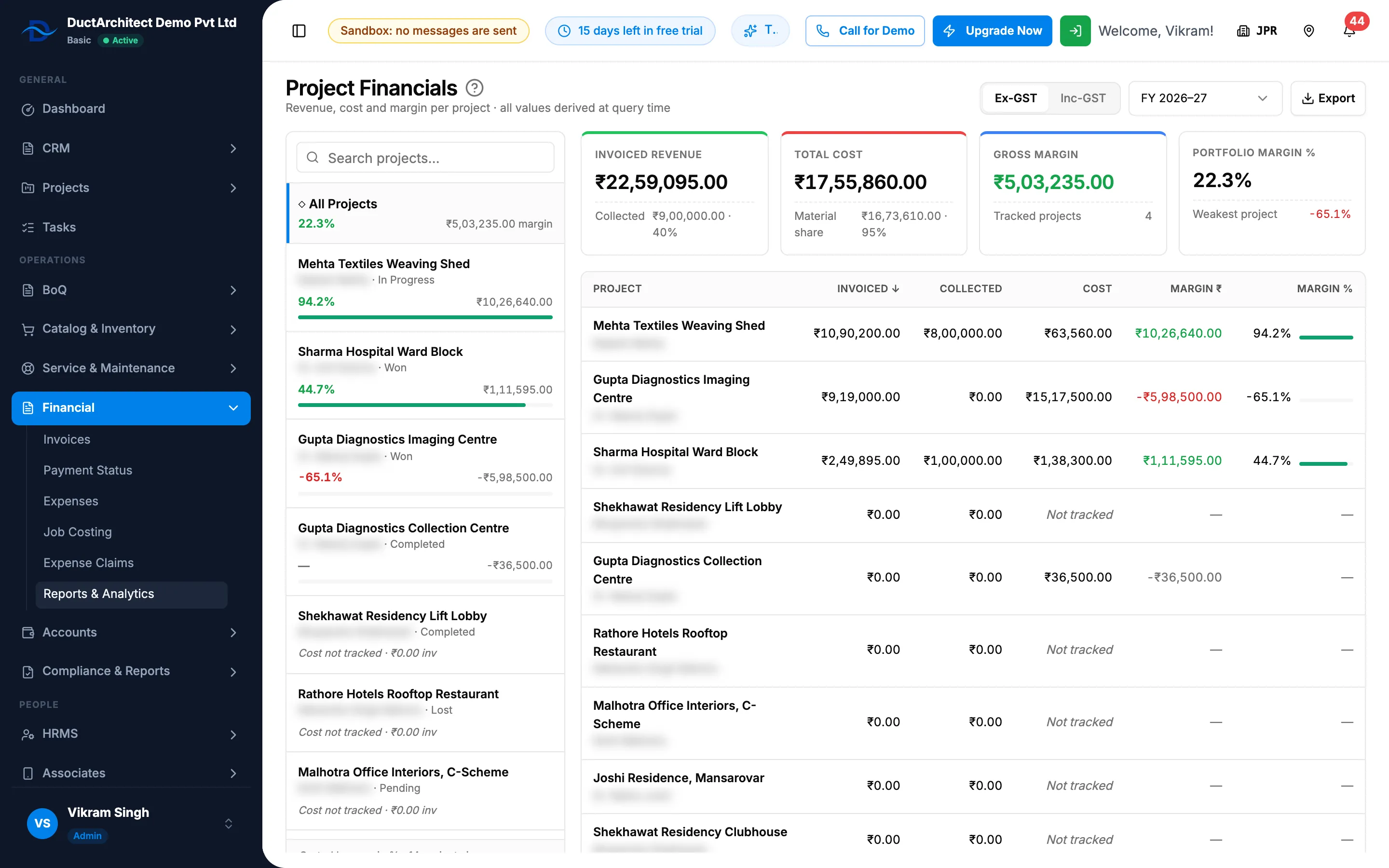
Step 1. Project Financials with Ex-GST and Inc-GST, the period, the KPIs and the project table. -
Choose Ex-GST or Inc-GST.
-
Choose the period: this or last financial year ("FY [yyyy]–[yy]", April to March), Last 12 months, All time or Custom range… with two dates.
-
Read the KPIs: Invoiced Revenue (with Collected), Total Cost (with Material share), Gross Margin (with Tracked projects) and Portfolio Margin % (with Weakest project).
-
Read the table: Project, Invoiced, Collected, Cost, Margin ₹ and Margin %.
-
To find a project, use "Search projects…" in the project list on the left. The list shows each project's margin bar.
Read one project
- Select the project in the table.
- Read its KPIs: Invoiced Revenue, Total Cost, Gross Margin and Margin %.
- Read the panels Revenue, Cost, Monthly Accrual ("Invoiced vs cost incurred, by month") and Margin Bridge, and Start tracking cost for this project.
Export
- Select Export.
- Choose Portfolio (Excel) for every project, or This project (Excel) for the one you opened.
Result
You see revenue against cost for the period and tax basis you chose. Revenue comes from the invoices; cost from the stock outs and expenses recorded for each project.
If something is different
- "Project Financials is turned off" with "Enable it in Settings → Modules to view this page.": the module is off. See Financial, Job Costing, Expense Claims or Project Financials is missing.
- "[number] invoice(s) had no stored GST split. Treated as ex-GST.": those invoices are counted without GST in both modes. "Stock-out and PO prices are treated as ex-GST in both modes (v1)."
- Total Cost reads "Not tracked" ("No stock-out or expense records") or Gross Margin reads "Cannot compute" ("Requires tracked cost"): the project has no cost recorded yet. See A report is refused, or its figures look wrong.
- Your financial year does not start in April: the FY periods here are always April to March. Use Custom range… for your own year.
- The margin column says ₹ for another currency: the column heading is fixed as Margin ₹.
- No Export: you do not have Can export lists.