
Before you start
- You need Add on Sales returns. Confirming the return on Sales Returns also needs Inventory Management.
- Record sales return: the invoice is an Individual invoice and is not a draft.
- Issue credit note: the invoice shows the amber line about units returned to stock.
Steps
Record a sales return
-
Open the invoice's page. See View an invoice and download its PDF.
-
Select Record sales return. "Record sales return" opens: "Confirming issues a GST credit note against this invoice."
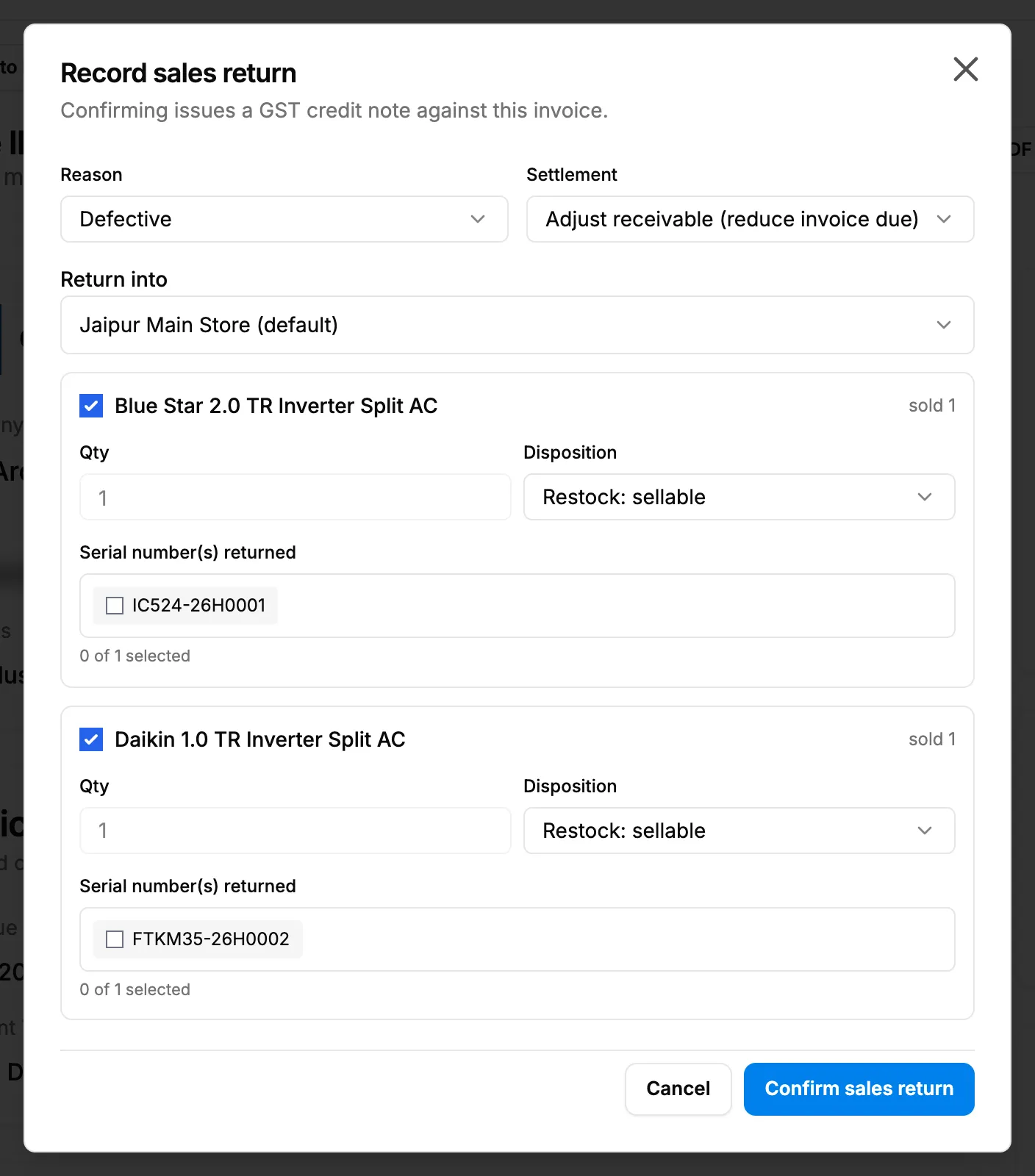
Step 2. The sales return box opened from an individual invoice. -
Check Reason (it starts on "Defective"), Settlement (for example "Adjust receivable (reduce invoice due)") and Return into (the godown, for example "Jaipur Main Store (default)").
-
Tick each invoice line that came back. The line shows the item and "sold [number]".
-
On each ticked line, enter the Qty and choose the Disposition, for example "Restock: sellable".
-
For an item with serial numbers, select the returned serial numbers under Serial number(s) returned. The count reads "[number] of [number] selected".
-
Select Confirm sales return. To leave without saving, select Cancel.
Issue a credit note for units already returned
- Open the invoice's page. Under the title, the amber line reads "[number] unit(s) returned to stock. Not reflected in this invoice. ≈ [value] (estimated at issue price) · last return [date]".
- Select Issue credit note. The sales return box opens, filled in from the units that came back.
- Check the lines and save the return.
Result
Confirm sales return confirms the return at once; it is not saved as a draft first. As the box says, "Confirming issues a GST credit note against this invoice." A sales return started on Sales Returns is saved as a draft instead: see Confirm or discard a sales return.
The credit note lowers what the client must pay on this invoice, and the invoice's status is worked out again. The invoice page then shows "Credit note(s) issued:" with the numbers and amounts, and Credit Notes: in the totals. How returns come back to stock is in How issued items come back: Out, Partial and Settled.
If something is different
- No Record sales return: the invoice is a Project or Service invoice, or still a draft, or you do not have Add on Sales returns.
- No Issue credit note: no units against this invoice are waiting for a credit note.
- An amber "⚠ [number] returned" chip on the list row: the same units, "not reflected in this invoice (estimated)". Issue the credit note from the invoice page.
- The invoice is wrong as a whole, not returned in part: cancel it instead. See Cancel an invoice.