
Before you start
- You need Add on Invoices and Can see selling prices. Your company's plan is active.
- The projects, clients or AMC contracts the invoices bill already exist.
Steps
Download the template
-
In the sidebar, select Financial › Invoices.
-
Select Download Template. "Download Template" asks: "Choose the invoice type to download the matching Excel template."
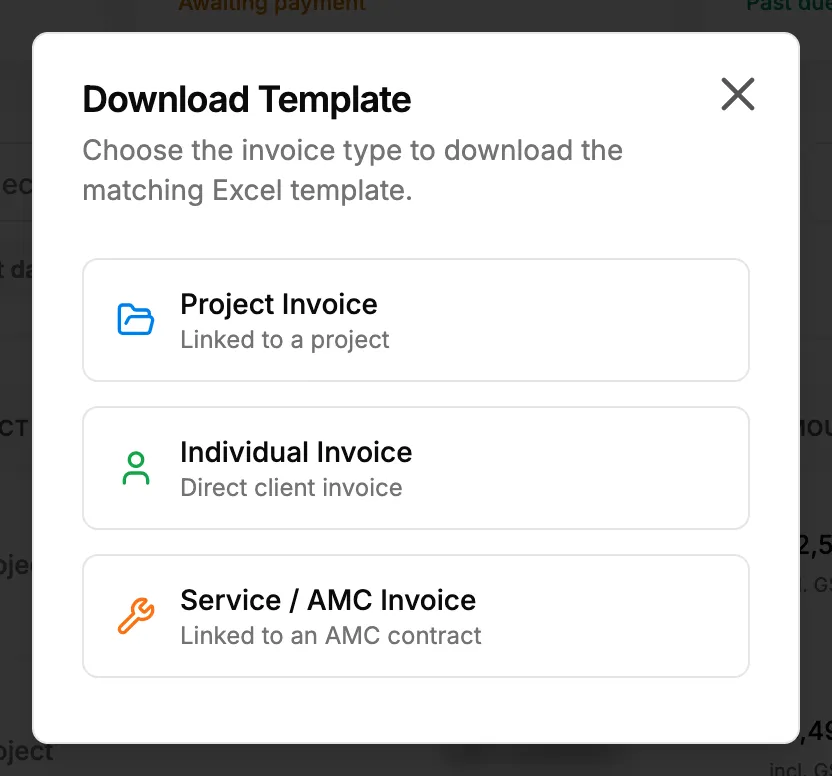
Step 2. The Download Template box with the three invoice types. -
Choose Project Invoice ("Linked to a project"), Individual Invoice ("Direct client invoice") or Service / AMC Invoice ("Linked to an AMC contract").
-
The template downloads (invoices_template_project.xlsx, invoices_template_individual.xlsx or invoices_template_service.xlsx), and "Template downloaded" shows.
Fill it in and upload it
- Open the template. Its sheet is "Project Invoices", "Individual Invoices" or "Service (AMC) Invoices". Row 2 marks each column "Required", "Optional", "Optional (auto-filled)", "Auto-calculated" or "Optional (branch code)".
- Project Invoices: invoiceNumber, projectName, invoiceDate, dueDate, status, milestone, paymentTerms, currency, taxRate, notes, clientName, clientEmail, clientAddress, itemDescription, itemQuantity, itemUnitPrice, itemAmount (worked out by a formula) and branchCode. The sheet "_projects" lists your project names.
- Individual Invoices: the same columns without projectName. clientName and clientAddress are required.
- Service (AMC) Invoices: amcContractNo in place of projectName.
- Fill in the template with your invoices.
- Save the file as .xlsx or .xls. It must be under 500 KB.
- Back on Invoices & Payments, select Bulk Upload and choose the file.
Result
The message shows the result, for example "Bulk upload complete: [number] created." Each new invoice is a Draft on the list, with no number yet. Check each one, then issue it. See Issue an invoice.
If something is different
- "Bulk Upload Failed: [number] Error(s) Found": select Download Error Report, fix the rows it lists and upload the file again. See Bulk upload failed with errors in my Excel file.
- No Download Template or Bulk Upload: you need Add on Invoices and Can see selling prices. See Amounts show Restricted, or invoice and costing buttons are missing.
- The file is refused before upload: it must be .xlsx or .xls and under 500 KB.
- A plan warning opens: see Create Invoice or Add Expense opens a plan or upgrade box.