
Before you start
- You need Financial Management and View on Job costing sheets. For the cost and margin columns, Can see purchase costs and Can see profit and margin.
- The Job Costing module is on for your company. It is off by default for Design & Consultation firms. See Switch a module on or off.
Steps
-
In the sidebar, select Financial › Job Costing. "Job Costing" opens on Projects: "Contract value against material, labour and other cost, for every project."
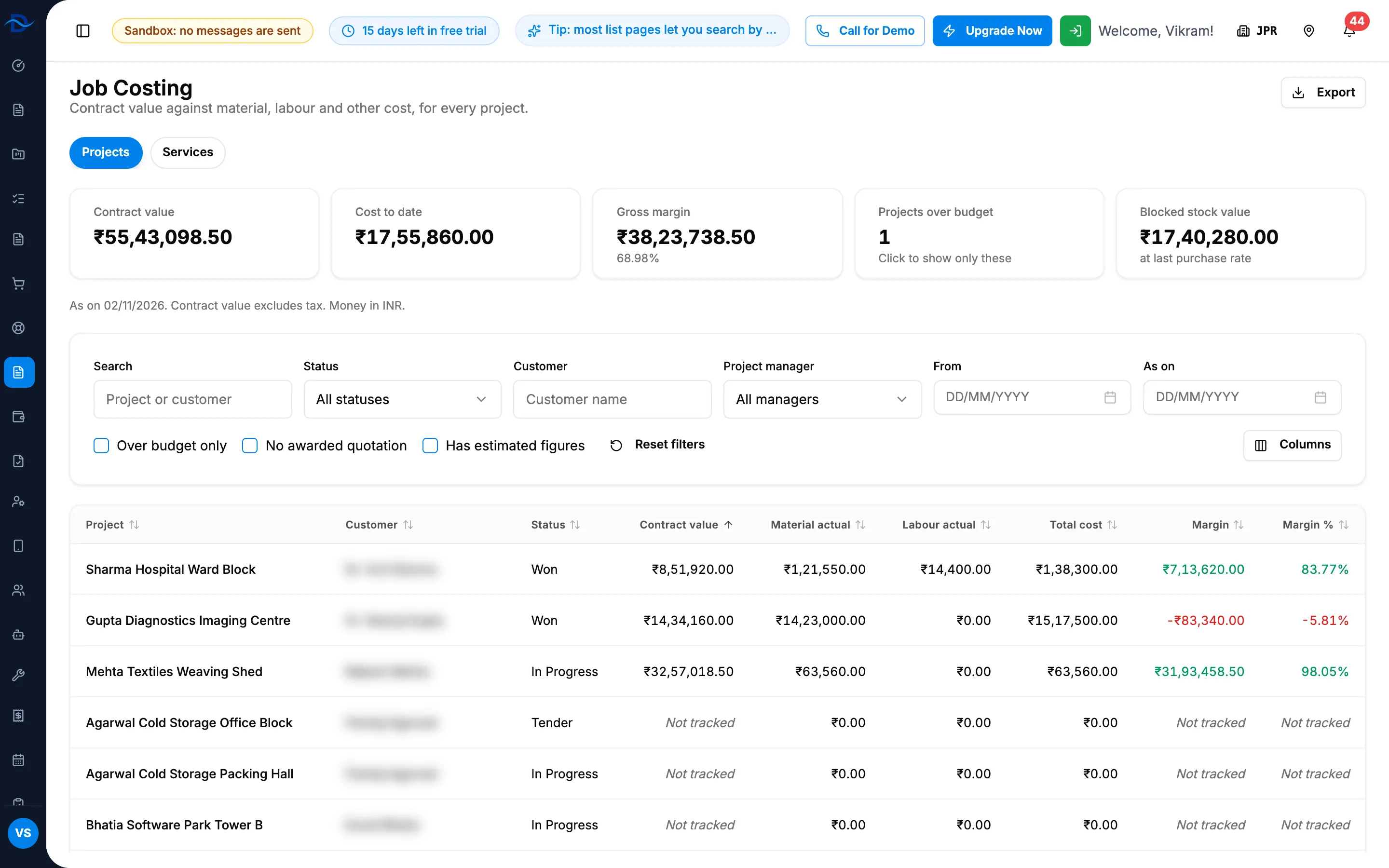
Step 1. Job Costing, Projects tab, with the cards, the filters and the sheet. -
Read the cards: Contract value, Cost to date, Gross margin, Projects over budget and Blocked stock value. The line below gives the dates and the currency: "As on [date], cost from [date]. Contract value excludes tax. Money in [currency]."
-
To see only the projects over budget, select Projects over budget. Select it again to clear it.
-
To narrow the sheet, use Search (project or customer), Status, Customer, Project manager, the dates From and As on, and the tick boxes Over budget only, No awarded quotation and Has estimated figures. Reset filters clears them.
-
To choose the columns, select Columns. Show all columns brings them all back.
-
Read each row. Every column is described in Job Costing: columns, figures and badges.
-
To open one project's job costing, select its row. See Read a project's job costing.
-
To export, select Export, then Export Excel or Export PDF. The file is named Job-Costing-[date].
Result
You see each project's contract value, quoted and actual material and labour, other expenses, total cost, margin, margin % and cost burn %, coloured by your margin threshold. A row with "Not tracked" has no awarded quotation and no contract value; "est." marks an estimated figure.
If something is different
- No Job Costing in the sidebar, or "Job Costing is turned off": see Financial, Job Costing, Expense Claims or Project Financials is missing.
- "[number] project stock-out(s) ... not linked to any project.": some stock outs have no project, so their material is in no row. Select View them.
- Cost or margin columns are missing or Restricted: you do not have Can see purchase costs or Can see profit and margin. See Amounts show Restricted, or invoice and costing buttons are missing.
- "Not tracked" or a figure looks wrong: see Job Costing says Not tracked, or a cost looks wrong.
- "No projects match these filters.": select Reset filters.
- Service contracts and one-off jobs: see Read job costing for service contracts and one-off jobs.