
Before you start
- You are the Owner or Admin.
- Turning a module off hides its screens. It does not delete any data.
Steps
-
Select your name at the bottom of the sidebar.
-
Select Settings.
-
Select the card Modules & Firm Type.
-
Find the module's row and turn its switch on or off.
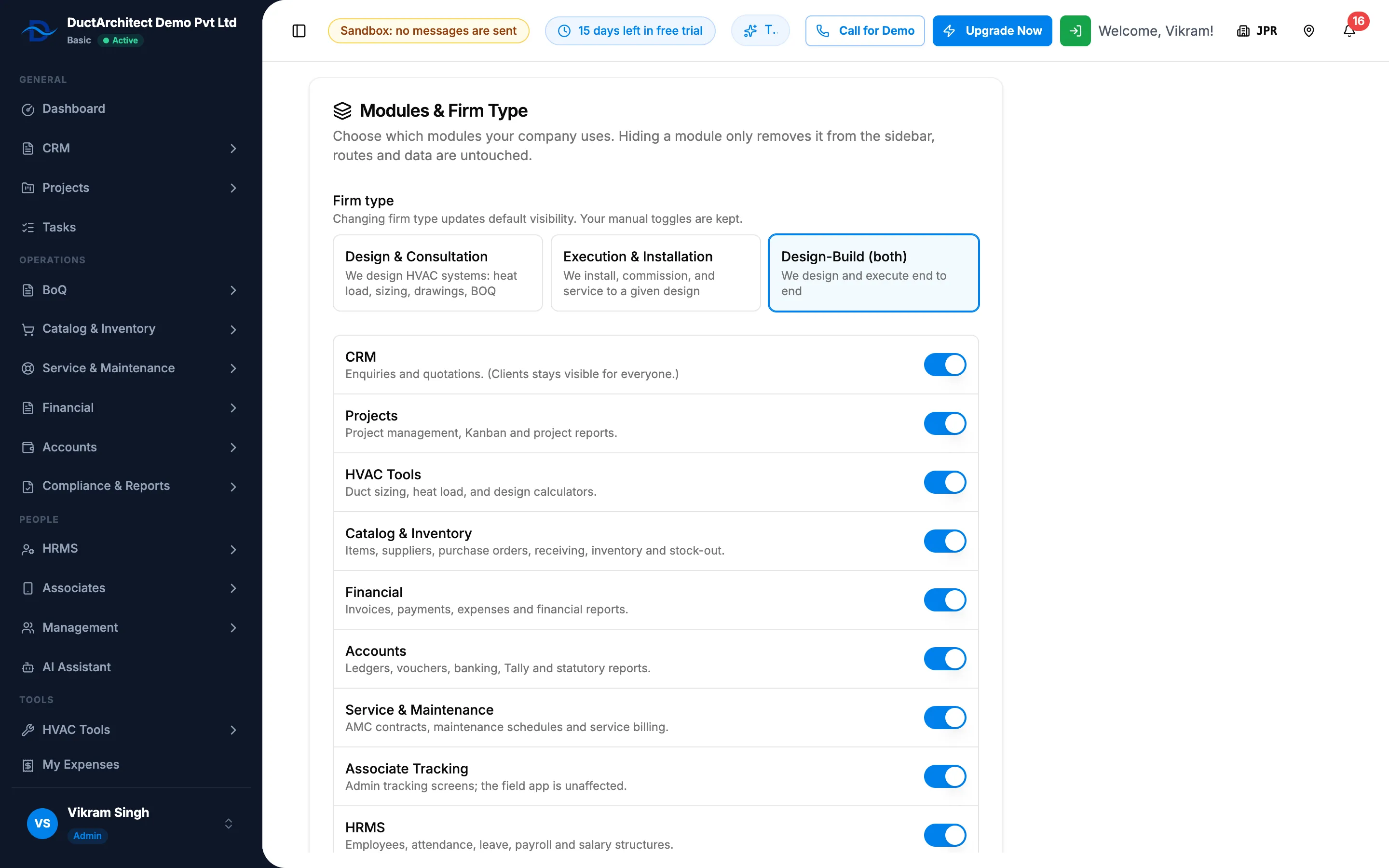
Step 4. Modules & Firm Type with the module switches. -
If the module has live data, the box "Disable" with the module name explains what is still open and that "Disabling this module hides the screens from the sidebar but does not delete any data." Select Disable anyway to go ahead.
-
Select Save.
Result
The message "Module settings saved" shows and the sidebar refreshes for everyone. A module you turned on appears for people who hold its permission. A module you turned off leaves the sidebar; its data stays.
If something is different
- "You need an admin role to manage company modules.": see "You need an admin role to manage company modules".
- The HRMS row is missing, or Tally Import (new) is greyed out: see The HRMS or Tally Import switch is missing or greyed out.
- "These settings could not be loaded.": select Try again. Nothing is shown rather than defaults, so your current settings are not overwritten.
- Pages still open from a saved link after you turn a module off: see A page opens by URL but is not in the menu.