
Before you start
- You are the Owner, Admin or HR. A person who is not an Owner or Admin also needs Can manage permissions for other people.
- You cannot give access to information you cannot see yourself.
Steps
Hide prices or customer details from a role
-
In the sidebar, select Management › Roles, or HRMS › Roles.
-
On the role's row, select the edit icon (Edit).
-
Under Sensitive information, untick what the role must not see: Can see selling prices, Can see purchase costs, Can see profit and margin, Can see salary and bank details or Can see customer contact details.
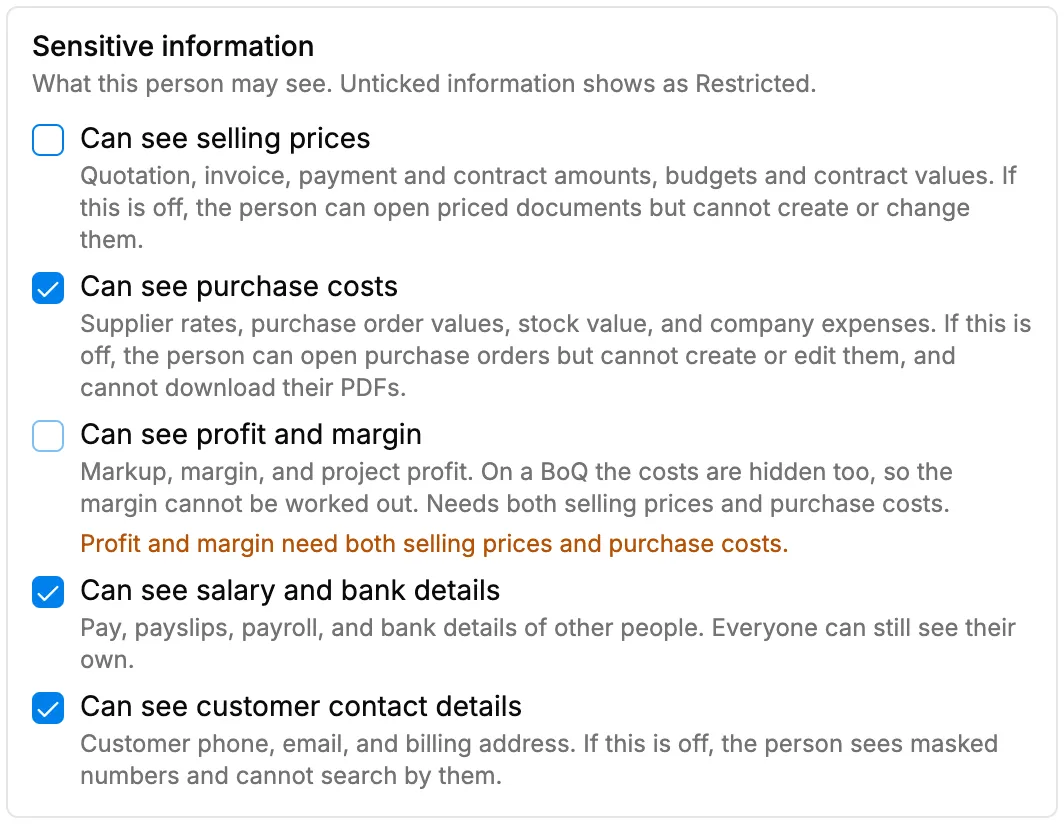
Step 3. The Sensitive information section with selling prices unticked. -
Select Update.
Limit a role to its own records or stop exports
- In the sidebar, select Management › Roles, or HRMS › Roles.
- On the role's row, select the edit icon (Edit).
- Under Records and export, untick one or both:
- Can see all records: "If this is off, the person sees only enquiries, customers, projects, and quotations that are their own: created by them, assigned to them, or on their project team."
- Can export lists: "Excel and CSV downloads of any list. Single document PDFs are not affected."
- Select Update.
Result
Hide prices or customer details from a role: the message "Role updated" shows. For people with this role, the hidden information shows as "Restricted", and they cannot create or change documents that carry it. Profit and margin are hidden whenever selling prices or purchase costs are hidden.
Limit a role to its own records or stop exports: the message "Role updated" shows. People with the role see only their own records in those lists, or see "You cannot export lists." when they try to export.
If something is different
- "Profit and margin need both selling prices and purchase costs.": the profit box is greyed out because one of the two boxes above it is unticked.
- One person needs a different setting: set it on the person. See Give one person different permissions from their role.
- A person added on HRMS › Employees with a custom role still sees prices: the role's settings may not reach them. Set it on the person with Custom for this person.
- Owner and Admin: they always see everything, see every record and can always export. These boxes do not apply to them.