
Before you start
- You need Financial Management and View on Invoices.
Steps
Open the invoice
-
On Financial › Invoices, open the row menu of the invoice and select View Invoice. "Invoice [number]" opens ("Invoice Draft" for a draft), with its type badge Project, Individual or Service.
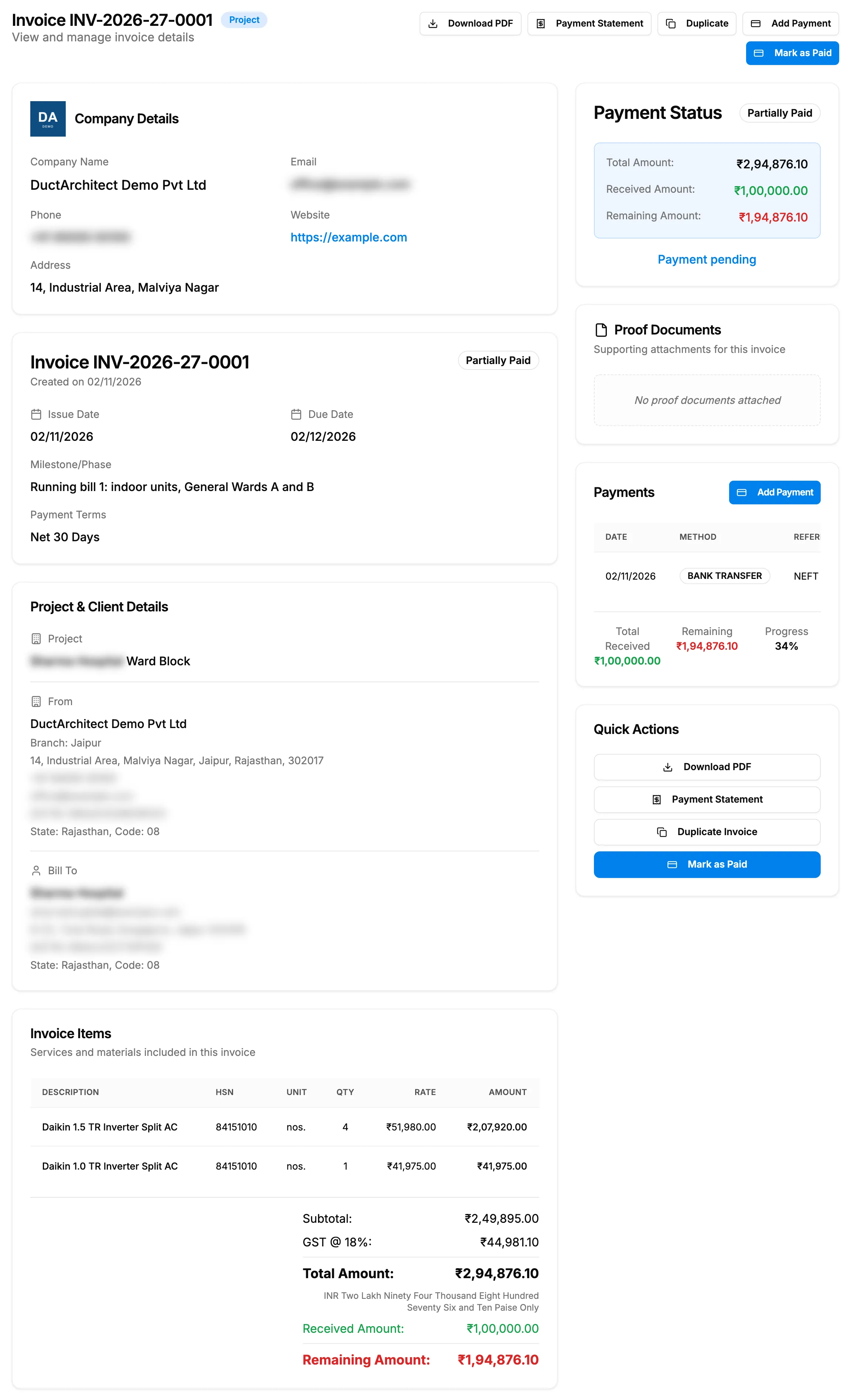
Step 1. An invoice's page with the invoice card, Project & Client Details and Invoice Items. -
Read the cards:
- the company card (Company Details, Email, Phone);
- the invoice card: "Created on [date]", the status, Issue Date, Due Date, Milestone/Phase and Payment Terms;
- Project & Client Details: the project, the From block with the seller's address, phone, email, "GSTIN: [number]" (or "Tax Registration No.: [number]") and "State: [name], Code: [nn]", and Bill To;
- Invoice Items: Description, HSN, Unit, Qty, Rate, Amount, then Subtotal:, the tax rows such as "GST @ 18%", Total Amount:, Received Amount:, Credit Notes: and Remaining Amount:;
- Payment Status, the proof documents ("Supporting attachments for this invoice") and Payments, with Remaining and Progress.
-
For a service invoice, read Services covered ("What this invoice bills, from its lines"). For stock issued against the invoice, read Issued Stock & Serial Numbers.
Download the PDF
- Select Download PDF.
- The file invoice-[number].pdf downloads, and "PDF downloaded successfully" shows.
Download the payment statement
- Once a payment is recorded, select Payment Statement.
- The file payment-statement-[number].pdf downloads, with the invoice and its payments. "Payment statement downloaded" shows.
Result
You see the invoice as it is today. The PDF is titled TAX INVOICE when your seller details carry a tax number and the invoice has tax above zero, and INVOICE otherwise. To go back, select Back to Invoices.
If something is different
- "Invoice Not Found" with "The requested invoice could not be found.": it was deleted, or the link is wrong. Search the list. See Find invoices: search, filter and export.
- Quick Actions says "No actions available.": you do not have Can see selling prices. See Amounts show Restricted, or invoice and costing buttons are missing.
- "No actions available for cancelled invoices." and no buttons in the header: the invoice is cancelled.
- Client email and phone are blank on the PDF: you do not have Can see customer contact details.
- An amber line "[number] unit(s) returned to stock. Not reflected in this invoice.": see Record a sales return or issue a credit note from an invoice.
- "Credit note(s) issued:" under the title: credit notes lower what the client must pay.
- No GST rows, or one Tax row: see The invoice has no GST column, or no CGST and SGST split.
- To send the PDF to the client: there is no email from DuctArchitect. See I can't email an invoice to the client.