
Before you start
- You need View on Quotations.
- The quotation is accepted, or has billing history.
- The Bill from Quotation module is on for your company. It is off by default for Design & Consultation firms.
Steps
-
Open the quotation's page.
-
Select the Billing tab.
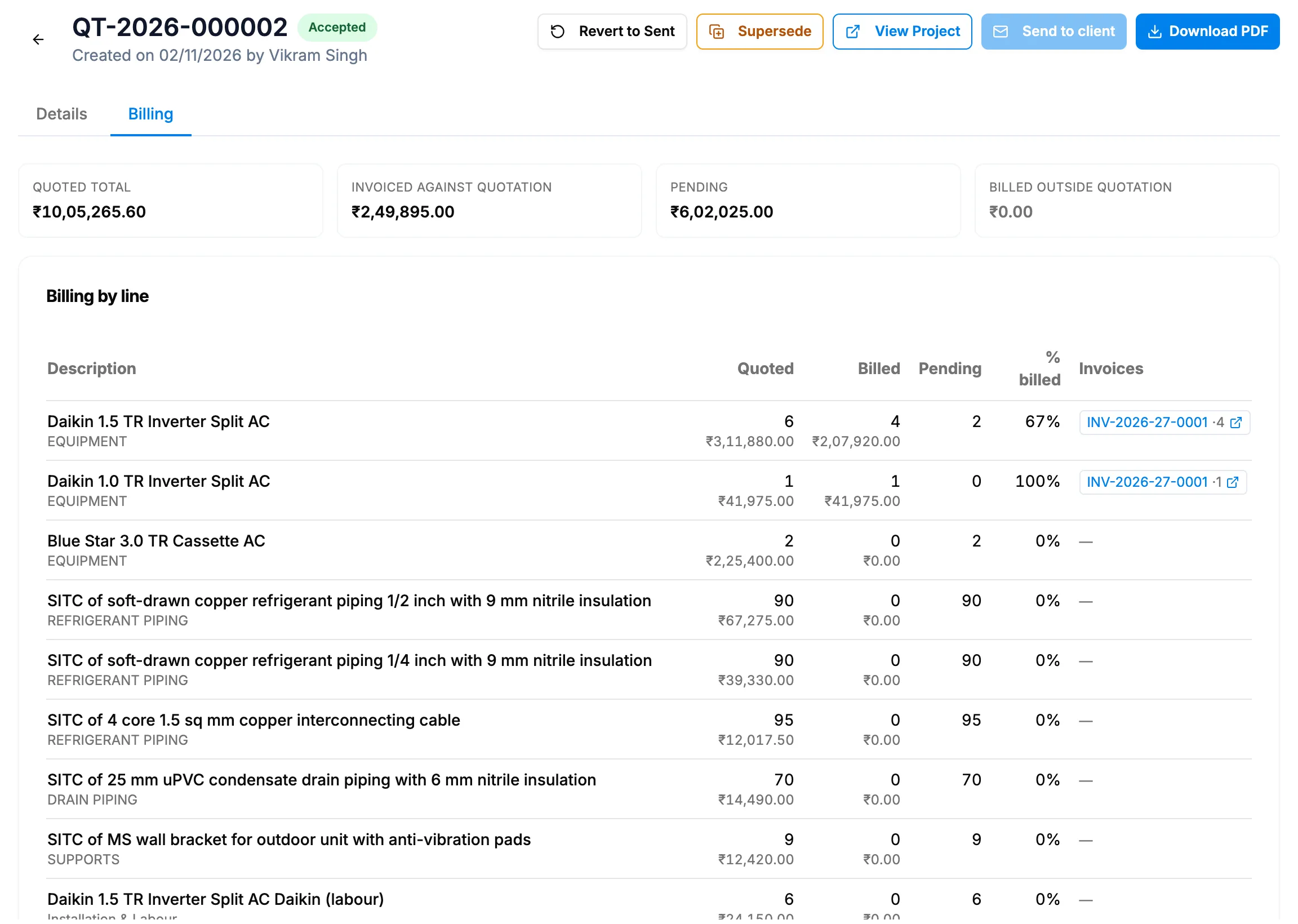
Step 2. The Billing tab with the totals and Billing by line. -
Read the totals: Quoted total, Invoiced against quotation, Pending and Billed outside quotation.
-
Read Billing by line: Description, Quoted, Billed, Pending (with "over-billed" when billed above the quote), % billed and Invoices.
Result
You see what is billed and pending for each line. Before any invoice: "Nothing has been billed against this quotation yet. Every line is fully pending."
Invoices are raised from the invoice form, where a project invoice offers "Bill from quotation [number]" for each awarded quotation. See Bill a project invoice from an awarded quotation.
If something is different
- No Billing tab: see The Billing tab is missing on a quotation.
- "not the awarded quotation", with "Invoices have been billed against this quotation, but it is no longer this project's awarded quotation (the award has moved on).": the award moved to another quotation after these invoices. The message lists the invoices concerned.
- "This quotation has no line items, so there is nothing to bill against.": add lines in a replacement. See Supersede an accepted quotation.