
Before you start
- You need Inventory Management and Edit on Items (or Add, for a new item).
- The item's category is AC Systems, Controls, Equipment or Ductwork. Only these categories have the Maintenance Template field.
- Maintenance templates are kept on Service & Maintenance › Templates. See Add, edit or delete a service template. From the item form you can pick one or create a new one.
Steps
-
In the sidebar, select Catalog & Inventory › Items.
-
Open the item with Edit Item, or select Add Item for a new one.
-
In Serviceable machine, choose Yes if the item is a machine you will service: "When yes, delivering this item to a client registers it as a machine for service and AMC."
-
In Maintenance Template, pick a template for the category.
-
If none fits, select Add New Template. The "Create New Maintenance Template" box opens.
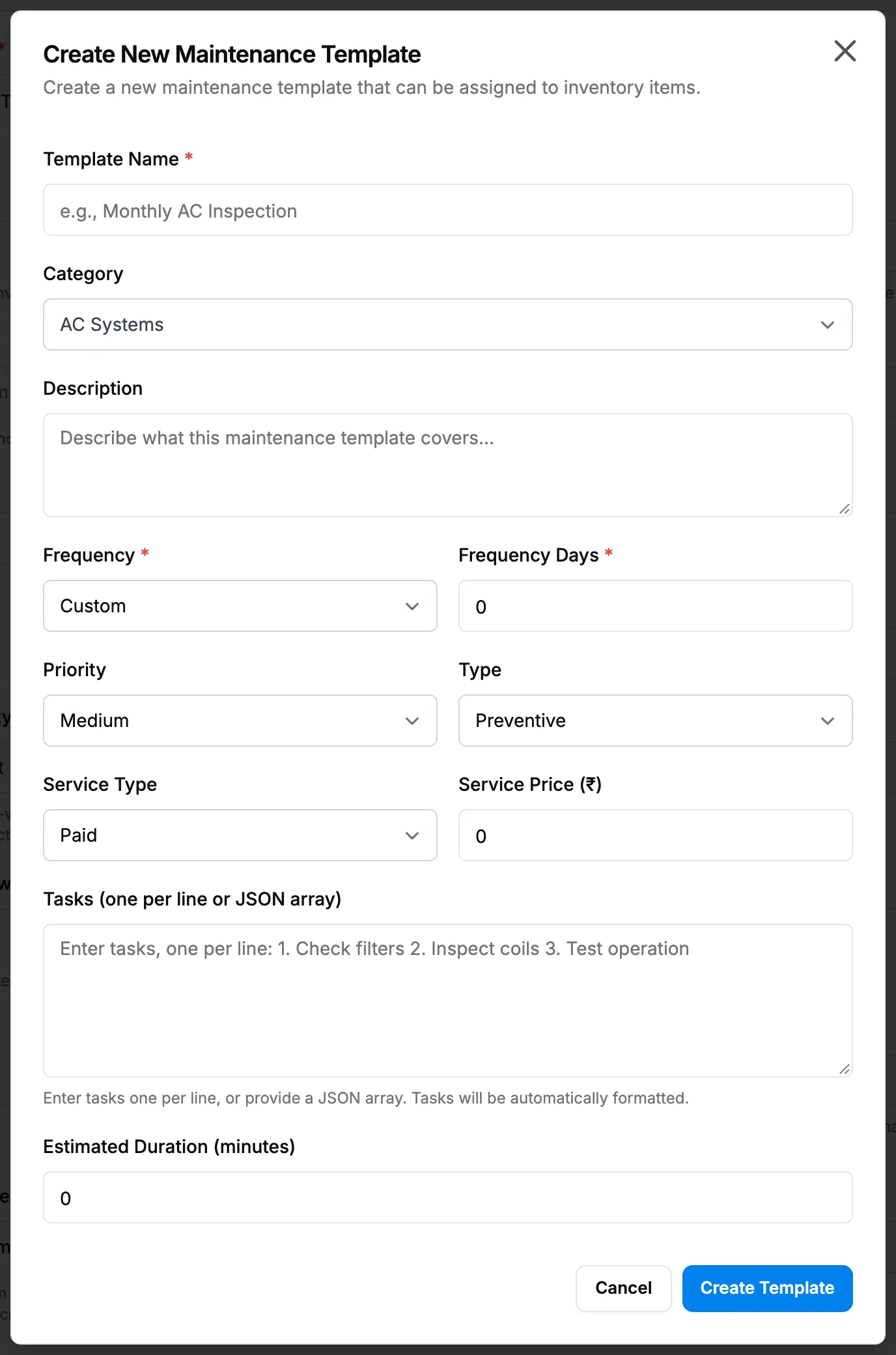
Step 5. The Create New Maintenance Template box opened from the item form. -
Fill in the template:
Field Required What to enter Template Name Yes The template's name. Category No The item category the template is for. Description No Free text. Frequency Yes How often the maintenance is due. Frequency Days Yes Only when the frequency is custom: the number of days. Priority No The priority of the maintenance. Type No The type of maintenance. Service Type No The type of service. Service Price (₹) No The price of the service. Shows only when Service Type is not Free. Tasks (one per line or JSON array) No The tasks of each visit, one per line. Estimated Duration (minutes) No How long a visit takes. -
Select Create Template. The new template is picked in Maintenance Template.
-
Select Save Changes, or Add Item for a new item.
Result
"Maintenance template created successfully" shows when you save a new template, then "Inventory item updated successfully" (or "Inventory item created successfully"). The Serviceable column on the list shows "Machine" for a serviceable machine.
"When this item is added to a project, maintenance records will be automatically created based on the template." How the machine and its visits are put on record: see How a client's machines get into Clients & Assets.
If something is different
- No Maintenance Template field: the category is not serviceable. See Equipment type, capacity or maintenance template is missing on the item.
- The template was cleared: you changed Category to one that is not serviceable.
- "Template name is required": fill in Template Name.
- "Frequency days is required when frequency is 'custom'": fill in Frequency Days.
- "Maintenance template not found": the template was removed. Pick another one.