
Before you start
- You need Inventory Management and Add on Stock outs. Your company's plan is active.
- The service contract exists. See Add an AMC contract or Add a service contract.
Steps
-
In the sidebar, select Catalog & Inventory › Stock Out.
-
Select Add Stock Out, then Service: "Issue items for a service job under an AMC contract". "Stock Out: Service" opens.
-
With several warehouses, choose Issue from. With branches, check the Branch.
-
In Service Contract, choose the contract. An expired contract is marked "Expired". The form also has a New service contract link.
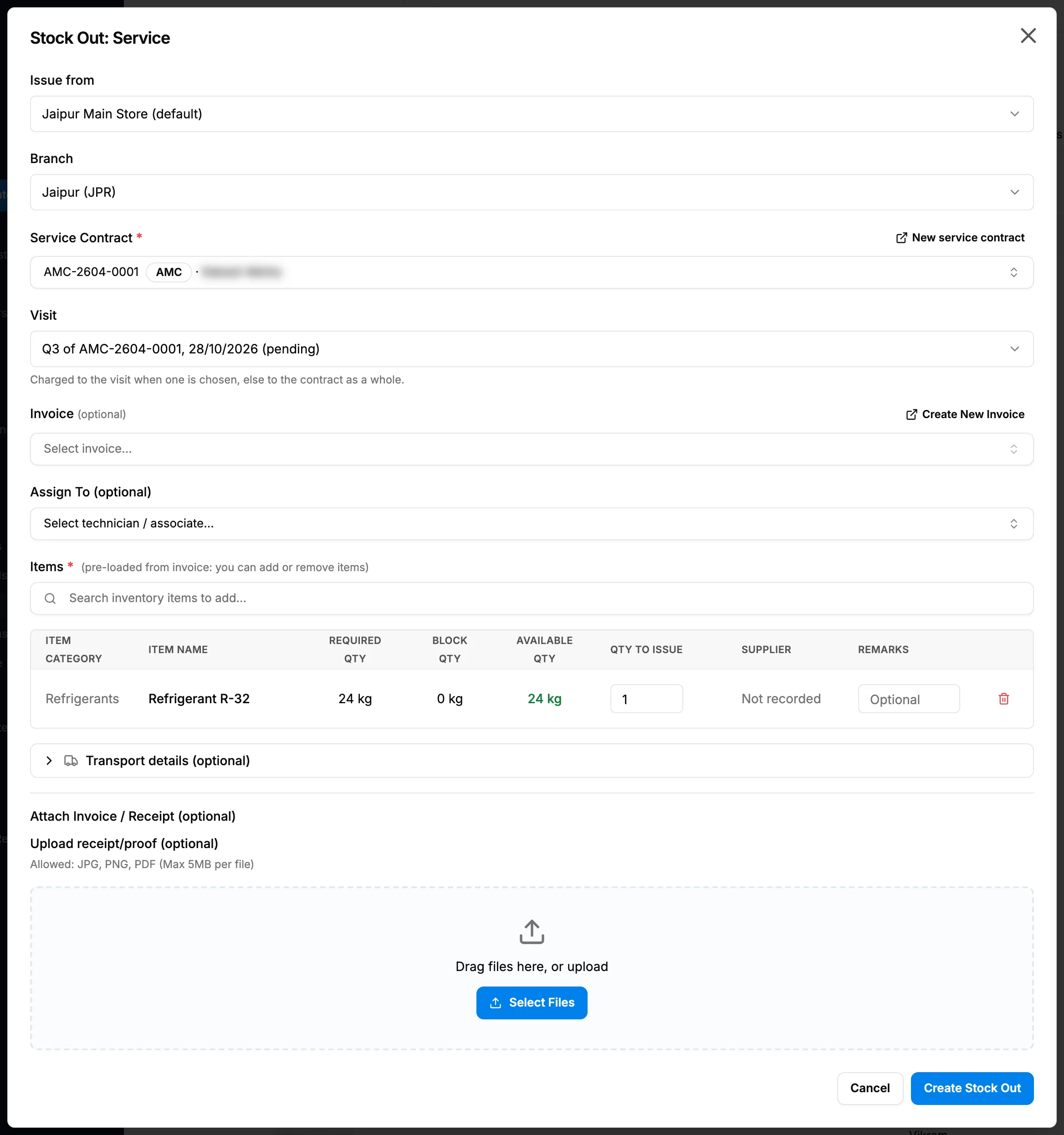
Step 4. Stock Out: Service with the contract, the visit and the items. -
In Visit, choose a visit (for example "Q3 of AMC-2604-0001, 28/10/2026 (pending)") or "Whole contract (no visit)": "Charged to the visit when one is chosen, else to the contract as a whole."
-
In Invoice (optional), choose an invoice, if there is one. Create New Invoice creates one from here.
-
In Assign To (optional), choose who takes the items, if you want.
-
Add the Items and enter the quantity to issue on each.
-
In Attach Invoice / Receipt (optional), add a file, if you have one.
-
Select Create Stock Out.
Result
"Stock out created successfully" shows ("Stock out created and receipts uploaded" with a file). On the Stock Out list, Project / Reference shows the contract with its type. The stock is charged to the visit or the contract.
Next: Generate, download or edit a delivery challan.
If something is different
- Not only AMC: the form takes any service contract, or a single visit, though its description says AMC.
- "Unavailable Items (Out of Stock)": those items have no stock in this warehouse.
- "Invoice items found but none are available in stock": none of the invoice's items can be issued from this warehouse.
- "The requested item has no stock in this warehouse": you came from a material request link, and the item has no stock here. Choose another warehouse.
- "Stock out created, but receipt upload failed": add the file afterwards. See Find and view stock outs, and manage their receipts.
- The form refuses to save: see A stock out cannot be saved.