
Before you start
- You need Inventory Management and View on Stock outs. To export, Can export lists.
Steps
Read the Returnable Items tracker
-
In the sidebar, select Catalog & Inventory › Returnable Items, or select Returnable Items on the Stock Out page. "Returnable Items Tracker" opens.
-
Choose a project in "Select a project...", or All Projects.
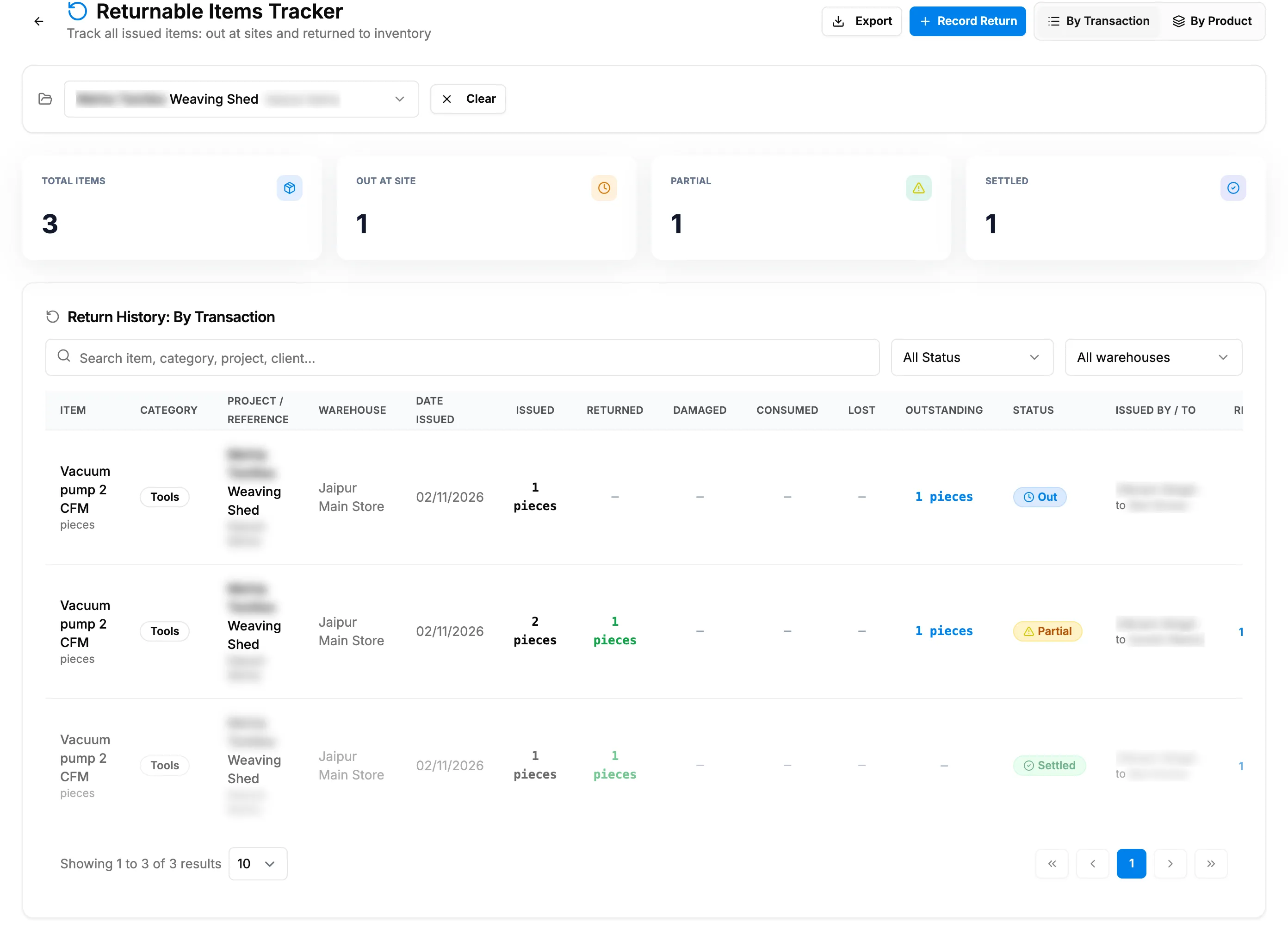
Step 2. The Returnable Items Tracker by transaction, with Outstanding and Status. -
Type in "Search item, category, project, client..." and choose a status: All Status, Out at Site, Partial Return or Settled. Clear removes them.
-
Choose the view: By Transaction (each issued line) or By Product (each item in total).
Read the Non-Returnable Items tracker
- In the sidebar, select Catalog & Inventory › Non-Returnable Items. "Non-Returnable Items Tracker" opens.
- Choose a project, search and choose a status: All Status, Out at Site, Partial Return or Fully Returned.
- Choose By Transaction or By Product.
Export a tracker
- Select Export, then the format.
Result
Read the Returnable Items tracker: By Transaction shows Item, Category, Project / Reference, Date Issued, Issued, Returned, Damaged, Consumed, Lost, Outstanding, Status, Issued by / to, Returns and Action (Return). By Product shows the same totals for each item. Status is Out, Partial or Settled.
Read the Non-Returnable Items tracker: By Transaction shows Issued, Returned, Remaining and Status. By Product shows Total Issued, Total Returned, Still Out, Good Qty, Damaged Qty and Status: Out, Partial or Returned.
Export a tracker: the file is named after "Returnable-Items" or "Non-Returnable-Items".
To record what came back, select Return on a line. See Return issued items to inventory.
If something is different
- "Select a project above to view its items": choose a project first.
- "No items found.": nothing matches. Clear the filters.
- An item is on the other tracker: its Site return tracking decides. See Return Items is missing, or an item is on the other tracker.
- A completed project warns that stock is still out at site: the project page links here. Record the returns, or mark the lines consumed or lost.
- No Record Return: you do not have Edit on Stock outs.