
Before you start
- You need Receiving Order and Add on Receivings. Your company's plan is active.
- The purchase order is Sent or Partially Delivered, and no stock on it has gone back to the supplier. See Email a purchase order to the supplier.
- For items in the AC Systems, Controls, Equipment and Ductwork categories, have the serial number of every unit. See Enter serial numbers when you receive a delivery.
Steps
Receive from Deliveries
-
In the sidebar, select Catalog & Inventory › Deliveries. "Delivery" opens on Pending Receipts: "Purchase orders ready for receiving or partially received".
-
Find the order: type its number or the supplier in "Search by PO number or supplier...", or choose Sent or Partially Delivered in the status filter.
-
On its row, open the row menu and select Delivery Items. "Delivery Items" opens: "Record received quantities for [PO number] from [supplier]". The order's delivery address shows as "Deliver to: [name], [address]".
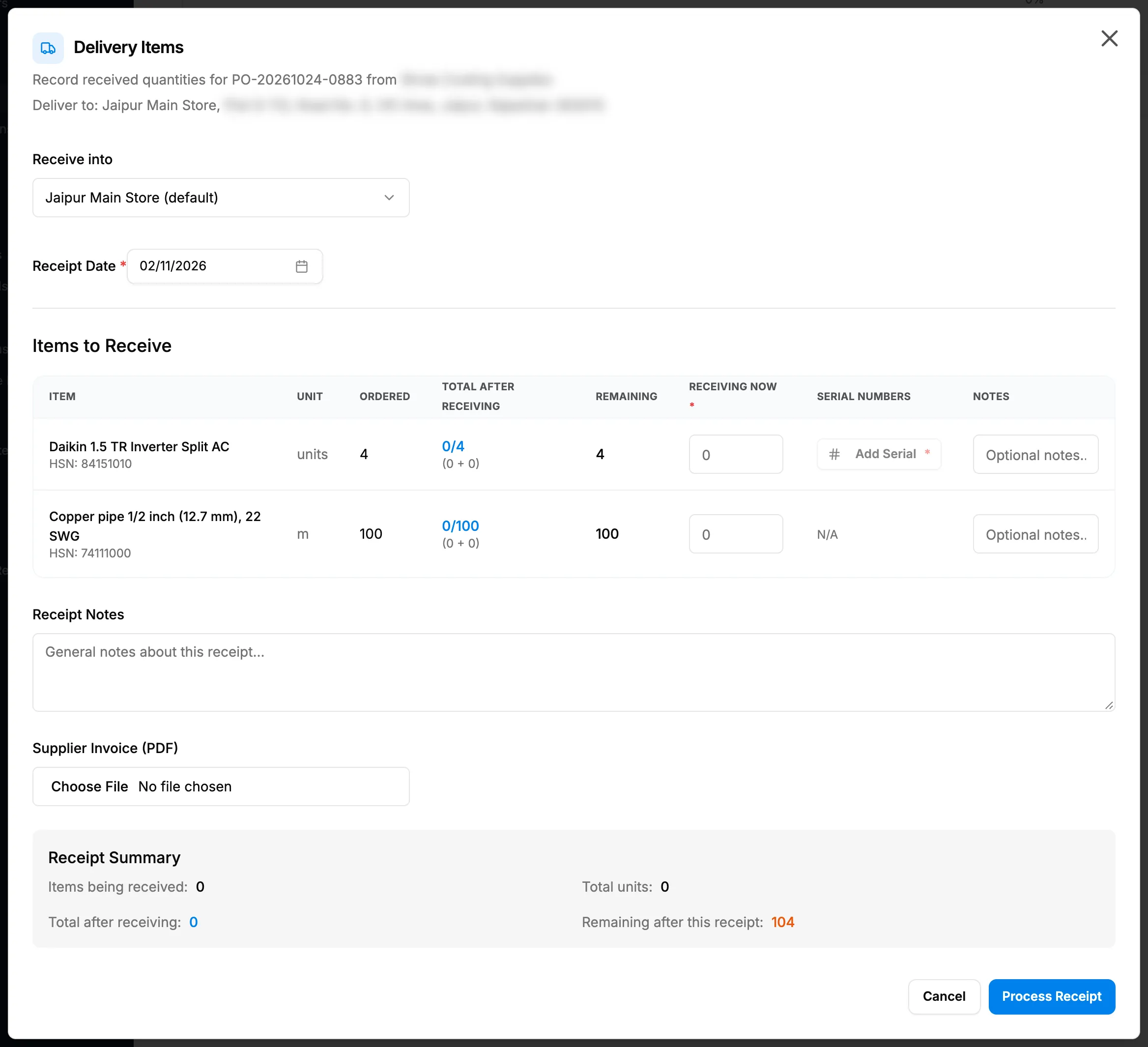
Step 3. The Delivery Items box with Receive into, Receipt Date and the Items to Receive table. -
Fill in the receipt:
Field Required What to enter Receive into Yes The warehouse the stock goes into. Starts on the order's Deliver to warehouse, else your default warehouse. Shown only with more than one active warehouse. Receipt Date Yes A date. Starts on today and cannot be in the future. Receiving Now Yes On each line, how many arrived now. Up to the line's Remaining. At least one line above 0. Serial Numbers No Add Serial on each serialised line, one serial number per unit. Required for AC Systems, Controls, Equipment and Ductwork in a countable unit. N/A for bulk units. Notes No On each line, "Optional notes...". Receipt Notes No "General notes about this receipt...". Supplier Invoice (PDF) No A file chosen here is not saved with a new receipt. Attach the invoice afterwards with Edit Receipt. -
Check each line's Total After Receiving (received so far plus now, against ordered) and Remaining.
-
Check the Receipt Summary: Items being received:, Total units:, Total after receiving: and Remaining after this receipt:.
-
Select Process Receipt. "Processing..." shows while it saves.
Receive from the Purchase Orders page
- On Catalog & Inventory › Purchase Orders, open the order's row menu and select Receive / Mark Delivered.
- The same Delivery Items box opens for that order. Continue from step 4 above.
Result
The message "Items received successfully" shows.
- The order is Delivered when everything ordered has arrived, or Partially Delivered when some is still to come. A partly received order stays on Pending Receipts for the next delivery.
- The receipt is on Receipt History with its number, REC-[year]-[digits], the date, the items and units received, and Recorded By.
- The stock is in the warehouse, at the purchase order line's price, with a "Receipt" movement. See Read an item's lots, serial numbers and movements.
- The goods are now payable to the supplier. When your company posts to the accounts automatically, a purchase voucher dated the receipt day is posted. See How invoices, payments, expenses and purchases reach your accounts.
Next: Issue stock to a project, or Record a payment against a purchase order.
If something is different
- The order is not on Pending Receipts, or Receive / Mark Delivered is missing: see A purchase order is not in Pending Receipts, or Receive is missing.
- "Exceeds remaining quantity", or a serial number message on Process Receipt: see A delivery cannot be processed.
- A plan warning or an upgrade box opens on Delivery Items: see Add Supplier, Add Purchase Order or Delivery Items opens a plan or upgrade box.
- You chose a file in Supplier Invoice (PDF): it is not saved with a new receipt. Attach it afterwards with Edit Receipt. See The supplier invoice I attached is not on the receipt.
- No Receive into: your company has one active warehouse; the stock goes there.
- Too many arrived, or the wrong item: receive what was ordered, then send the rest back. See Return stock to a supplier.
- Damaged goods: there is no field for the condition on receipt; every line is received as good. Return damaged units to the supplier.