
Before you start
- You need Receiving Order and Edit on Receivings.
- The receipt is a supplier receipt, not your opening stock import.
- To correct a serial number, the unit is still in stock: not issued to a customer, not on a stock out and not returned to the supplier.
Steps
Correct serial numbers or attach the supplier invoice
-
In the sidebar, select Catalog & Inventory › Deliveries, then Receipt History.
-
Find the receipt. See Find pending deliveries and receipts, and download a goods receipt note.
-
On its row, open the row menu and select Edit Receipt. "Edit Receipt" opens: "Edit serial numbers or quantities for [PO number] from [supplier]", with "Warehouse: [name]" under it.
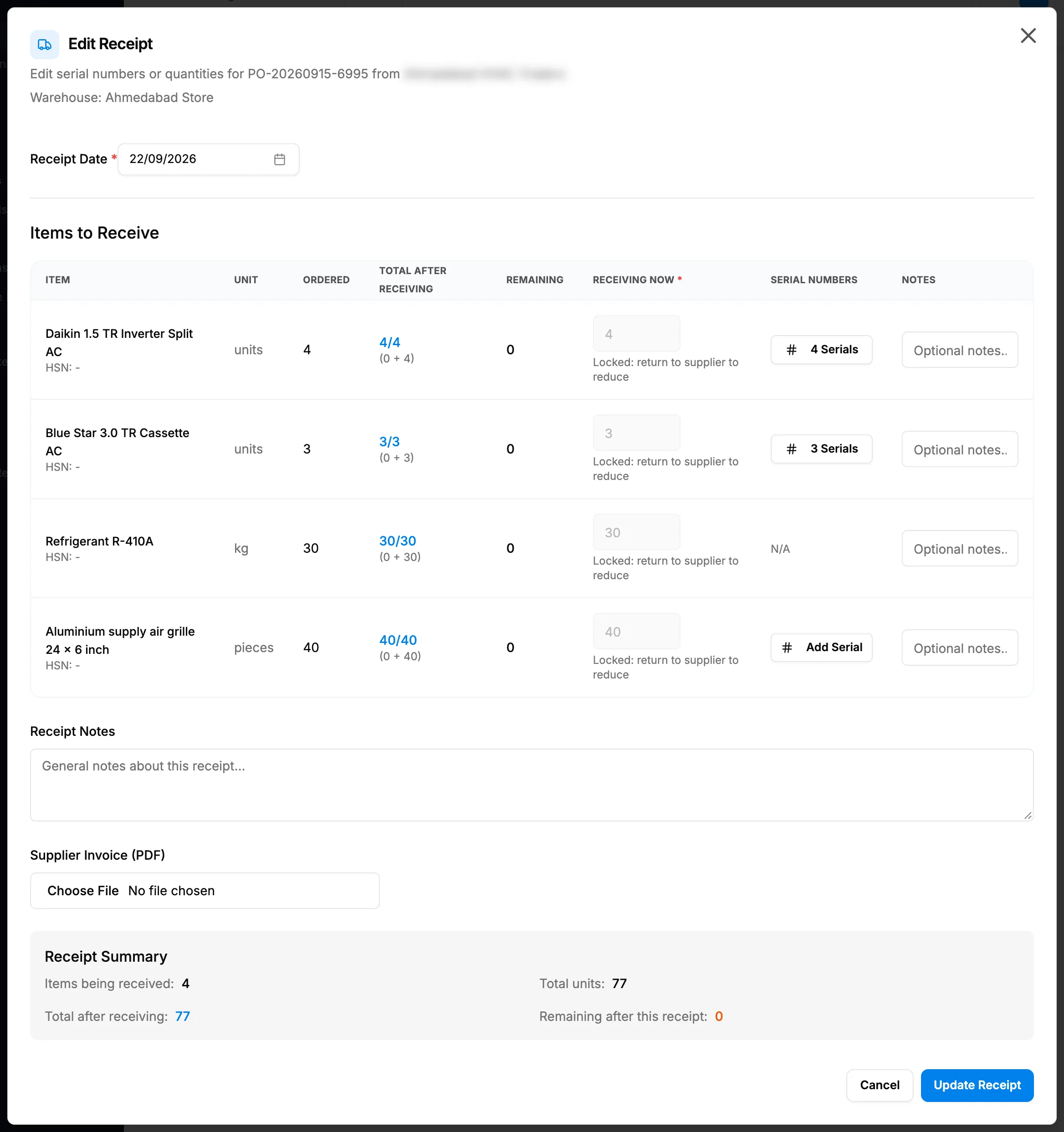
Step 3. Edit Receipt with Receiving Now locked and the serial number buttons. -
To correct serial numbers, select the line's serial button, change the numbers and select Save Serial Numbers. Units that went back or were issued show under "Returned to supplier: locked" or "Issued to a customer: locked" and cannot be changed.
-
To attach the invoice, choose the file in Supplier Invoice (PDF): a PDF under 10 MB. Clear removes your choice.
-
Change Receipt Date if needed.
-
Select Update Receipt.
Change the date or notes only
- On the receipt's row in Receipt History, open the row menu and select Edit date and notes. "Receipt [number]. Quantities, serial numbers and the warehouse are not changed here."
- Change Received date: "The purchase voucher and the Supplier Ledger follow the new date." It cannot be in the future.
- Change Notes (up to 2000 characters).
- Select Save. It is greyed until you change something.
Result
- Edit Receipt: "Receipt updated" shows. The serial numbers, the invoice and the date are saved; the order's status is worked out again. View Invoice now shows on the receipt's row and in Receipt Details.
- Edit date and notes: "Receipt date and notes saved" shows.
When your company posts to the accounts automatically, the purchase voucher moves to the new date.
If something is different
- Receiving Now is locked: "Locked: return to supplier to reduce" (the tooltip reads "Received quantity cannot be changed here, use Return to Supplier"): see I can't change the quantity on a receipt.
- Edit Receipt is greyed: "Opening stock receipts cannot be edited." or "Only serial numbers can be corrected, and no serial number on this receipt is still in stock.": there is nothing on this receipt you can change there.
- Edit date and notes is greyed: "Opening stock is not a supplier receipt and cannot be edited here."
- "[items]: returned units are shown as locked and cannot be changed. Everything else on this receipt is editable.": part of the receipt went back to the supplier.
- "View only. You cannot edit receivings." and only Close: you do not have Edit on Receivings. The menu items still show.
- "Accounts posting starts on [date]. A receipt cannot be moved across that date, because the opening balance already counts the receipts dated before it.": keep the date on the same side of your accounts posting start date. See How invoices, payments, expenses and purchases reach your accounts.
- "Only PDF files are allowed" or "File size exceeds 10MB limit": choose a PDF under 10 MB.
- "Cannot change serial number(s) [list]. Already issued to a customer.": those units have left your stock.