
Before you start
- You need Purchase Orders, Can see purchase costs, and Add or Edit on Purchase orders.
- The rate comes from earlier orders for the item that were received and not all sent back. Cancelled and deleted orders do not count.
Steps
Read the rate on a line
-
Open Add Purchase Order, or Edit Order on an existing order.
-
Pick the Supplier, then the Item on a line.
-
Read the line under Unit Price:
- "Last purchased from this supplier on [date] at [rate]": your last receipt of this item from this supplier. When a later purchase came from another supplier at another rate, a second line shows "Latest from [supplier]: [rate] on [date]".
- "Last purchased from [supplier] on [date] at [rate]": you have not bought it from this supplier; this was the last purchase from anyone.
- "No previous purchase".
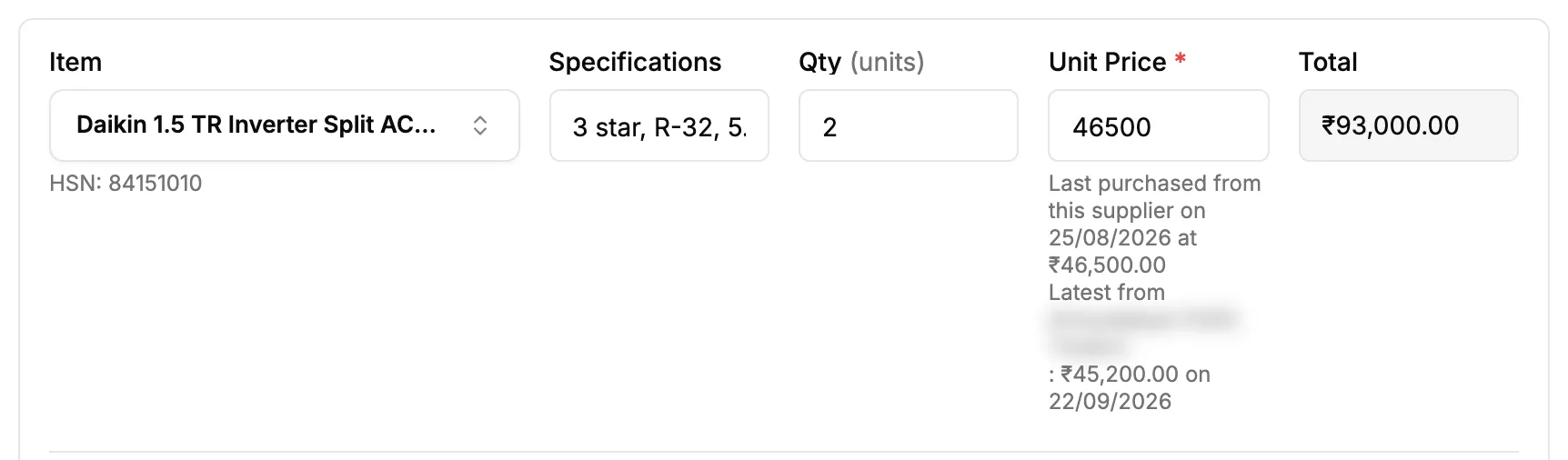
Step 3. A purchase order line with the last purchase rate under Unit Price. -
On a new line, Unit Price starts at the last purchase rate, or at the item's catalog price when there is none. Type another price if the supplier quoted one.
Change the supplier on an order with lines
- Pick another Supplier.
- If the new supplier has earlier rates for some of the items, "Update rates?" asks: "[supplier name] has previous rates for [number] of [number] items. Update those rates?"
- Select Update rates to use the new supplier's rates, or Keep current rates.
Result
The line's Unit Price and Total show the rate you chose, and the totals follow. A price you typed yourself is never replaced by a rate.
The date of a rate is the day the goods were first received on that earlier order. The item's Edit Inventory Item box shows the same rate as Last purchase rate.
If something is different
- No rate line under Unit Price: you do not have Can see purchase costs, or no item is picked yet.
- The supplier cannot be changed: it is locked once the order is sent or stock is received. See A purchase order or one of its lines cannot be edited.
- A line opened from Reorder: Unit Price shows the last purchase rate with "Last purchase price", or stays empty. It never takes the catalog price.
- "No previous purchase" on an item you hold: stock from the opening stock import does not count as a purchase.
- The rate looks old: an order whose stock all went back to the supplier is not counted, so an earlier order's rate shows.