
Before you start
- You need Purchase Orders, Edit on Purchase orders, and Can see purchase costs.
- The order is Draft, Sent or Partially Delivered. A delivered, cancelled or returned order cannot be edited.
Steps
-
In the sidebar, select Catalog & Inventory › Purchase Orders.
-
On the order's row, open the row menu and select Edit Order. "Edit Purchase Order" opens with the saved order. The box has no Order Number or Order Date.
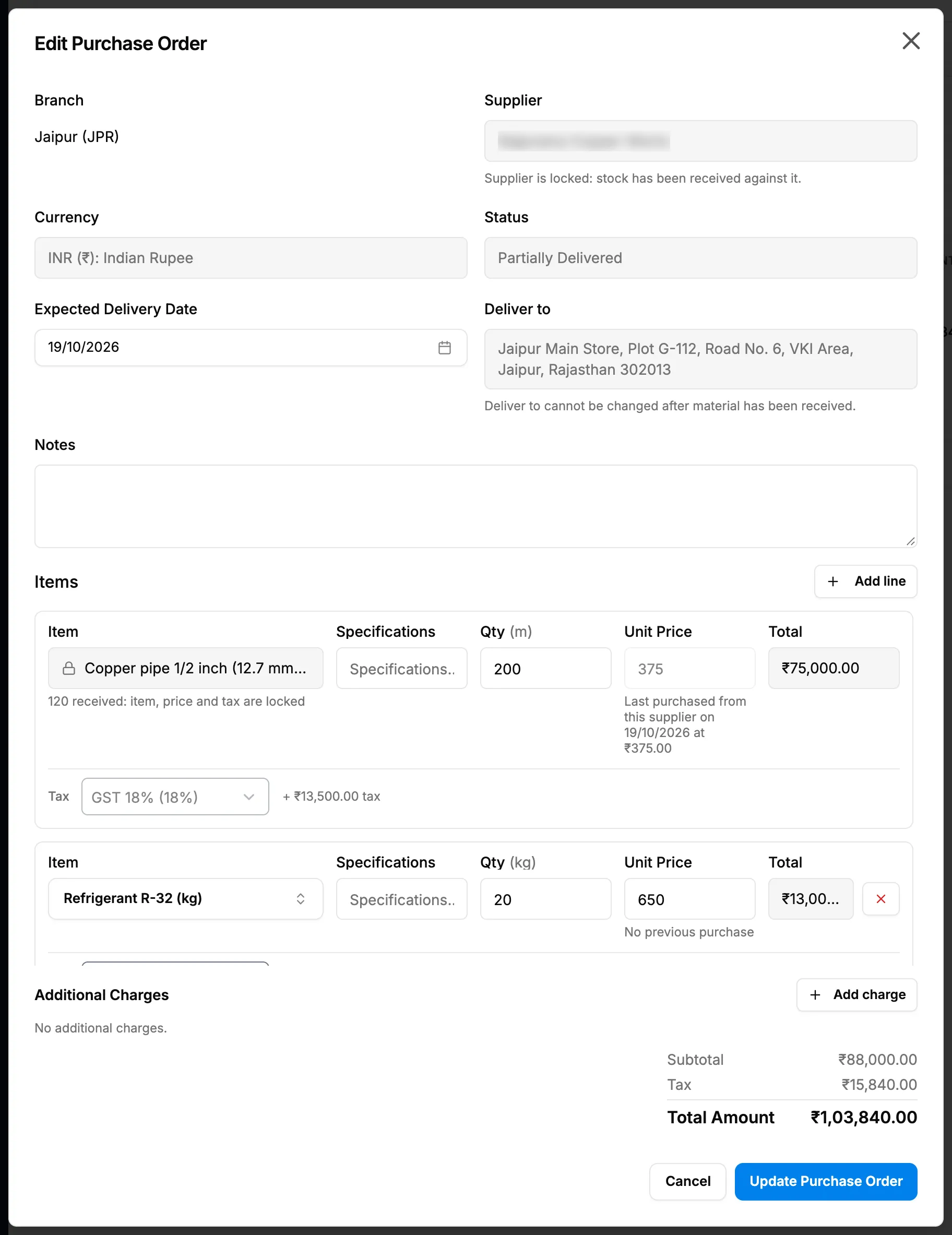
Step 2. Edit Purchase Order with the Status field and a received line showing its lock. -
Change the lines: edit Qty, Unit Price, Specifications or Tax, select Add line for a new item, or remove a line. A line with goods received shows "[quantity] received: item, price and tax are locked".
-
Change the Additional Charges if needed. See Add freight and other charges to a purchase order.
-
Change Expected Delivery Date, Deliver to or Notes if needed. Once material is received, Deliver to is greyed with "Deliver to cannot be changed after material has been received." See Choose where a purchase order is delivered.
-
On a draft, change the Supplier or Branch if needed. Once stock is received, Supplier shows "Supplier is locked: stock has been received against it."
-
To change the status, choose Draft, Sent or Cancelled in Status. On a Partially Delivered order, Status is read only.
-
Check the totals (one Tax row) and select Update Purchase Order.
Add and Edit Purchase Order: every field says when each field is locked.
Result
The message "Purchase order updated successfully" shows. If you changed nothing, "No changes to save." shows instead.
Each save that changes lines or charges is added to the order's Change history, with the old and new values and the new total. Changes to the status, notes, dates, delivery address, supplier or branch are not in that history. See View a purchase order, its change history and its PDF.
If your new quantities leave nothing still to receive, the order moves to Delivered, Returned to Supplier or Partially Returned.
If something is different
- "The supplier has an older copy. Resend the purchase order to update it.": the order was emailed before your change. See Email a purchase order to the supplier.
- "View only. You cannot edit purchase orders." and only Close: you do not have Edit on Purchase orders. The menu item still reads Edit Order.
- No Edit Order in the row menu: the order is delivered, cancelled or returned, or you do not have Can see purchase costs.
- A field is greyed or the save is refused: see A purchase order or one of its lines cannot be edited.
- Cancelled is greyed in Status: see A purchase order with received stock cannot be cancelled.
- Delivered is not in Status: "Mark a purchase order delivered by recording a receipt in the Receiving flow, status cannot be set directly." See Receive a delivery against a purchase order.
- An item is missing from the item list: see An item cannot be found on the Purchase Orders page.
- Expected Delivery Date cannot go before today: the picker starts at today when you edit.