
Before you start
- You need Purchase Orders, Can see purchase costs and View on Suppliers.
Steps
-
Open the supplier's page: select its row on Catalog & Inventory › Payables, or View Details on Suppliers.
-
Select the Ledger tab.
-
Read the cards: Total ordered, Total received, Total returned, Total paid, Outstanding payable, Advance, Open POs, Last purchase date and Last payment date. With something outstanding, Ageing of the outstanding payable (days from receipt) shows the amount by age.
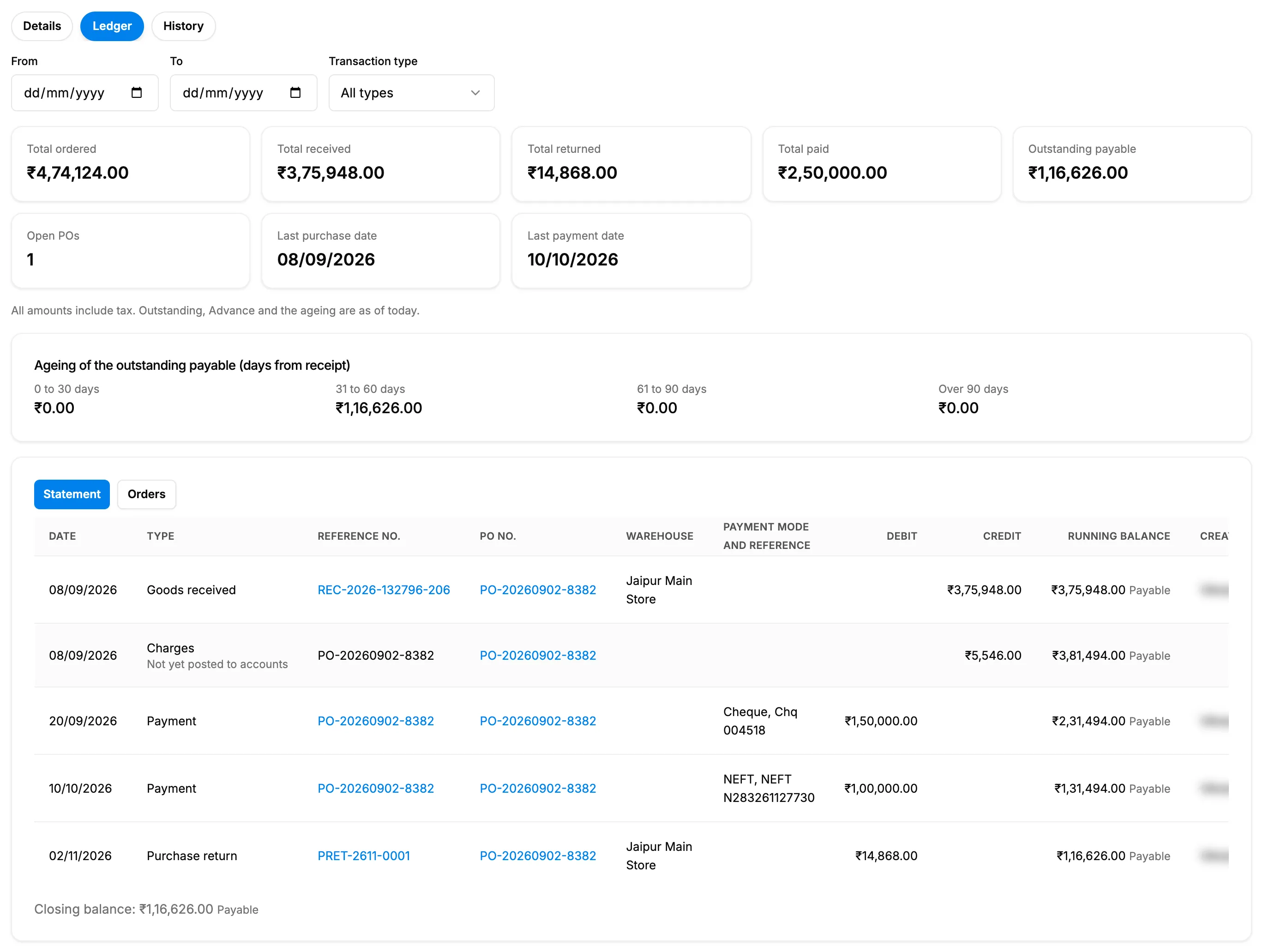
Step 3. The Ledger tab with its summary cards, the ageing card and the Statement view. -
Select Statement to see each document with Debit, Credit and Running balance, and its Warehouse, Payment mode and reference and Created by. A receipt adds to what you owe; a return or a payment takes from it. Goods received and charges are in Credit, payments and purchase returns in Debit.
-
To narrow the statement, use the filters at the top of the Ledger tab, above the cards: From, To and Transaction type (All types, Goods received, Charges, Purchase return, Payment, Opening balance). Clear filters removes them.
-
Select a Reference no. or PO no. to open that receipt, return, payment or order on its own page.
-
Select Orders to see one row per purchase order: Ordered value, Received value, Returned value, Paid, Pending to receive and Pending to pay.
Result
The statement ends with "Closing balance: [amount]" and Payable, Advance or Settled. With a From date, the first row is "Balance brought forward". The Orders view ends with "Total (counted orders)".
"Purchase orders never enter the running balance: the liability starts when goods are received." Every column is explained in Supplier Ledger, PO Payments and Payables: cards, columns and badges.
If something is different
- "You do not have access to supplier amounts.", or no Ledger tab: see Purchase amounts show Restricted or are refused.
- "Differs from Accounts: …" under the cards: see The Supplier Ledger says it differs from Accounts.
- "Opening balance entered in Accounts; documents before the posting start date are not listed.": the balance before that date comes from the accounts, in one row.
- A Charges row says "Not yet posted to accounts": additional charges on the order are payable but not posted yet.
- An order is flagged "Draft, not counted" or "Cancelled, not counted": it does not count in the totals.
- "The start date is after the end date": swap From and To.
- "No transactions yet": "This supplier has no purchase orders, receipts, returns or payments."
- No export: the Ledger tab cannot be exported. Export Payables instead.