
Before you start
- You need Purchase Orders and View on Purchase orders. To see amounts, Can see purchase costs; to export, Can export lists.
- For an expected payment date, the supplier has Payment Terms. See Add or change payment terms from the supplier form.
Steps
-
In the sidebar, select Catalog & Inventory › PO Payments.
-
Read the cards: Payable now, Total Paid and Overdue POs. They count every order your filters match, not only this page: "Totals for all orders, not only this page. Payable now is netted per supplier, as on Payables."
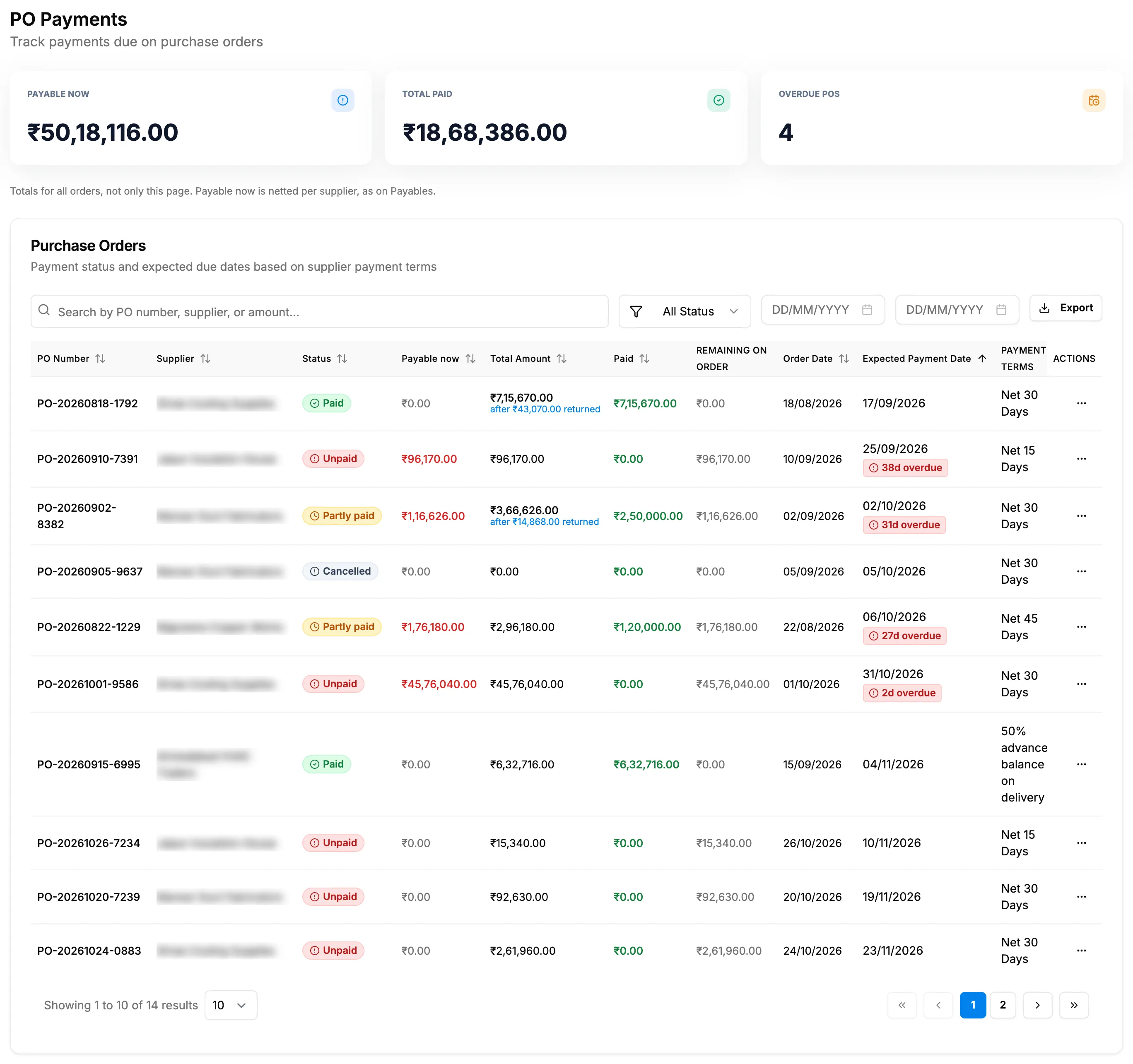
Step 2. PO Payments with the Payable now, Total Paid and Overdue POs cards and the list. -
To see only overdue orders, select the Overdue POs card, or choose Overdue in the status filter.
-
To narrow the list, search ("Search by PO number, supplier, or amount..."), choose a status (All Status, Overdue, Unpaid, Partly paid, Paid, Refund due, Cancelled, Draft) and set the order date range. Clear Filters removes them.
-
Read each order's Payable now, Paid, Remaining on order, Payment Terms and Expected Payment Date. A red "[number]d overdue" chip or "Due today" shows when a payment is due. After a return, Total Amount shows "after ₹[amount] returned" under it. A sent order with only an advance shows "Advance ₹[amount]" in Payable now, with Partly paid.
-
To download the list, select Export, then the format.
On a narrow screen, "Scroll sideways to see every column."
Result
You see what to pay and when. Supplier Ledger, PO Payments and Payables: cards, columns and badges explains each column.
To pay, select Add Payment in the row menu. See Record a payment against a purchase order. Export: a file named after "PO-Payments" downloads with the same filters and order.
Every day, each order with something payable now past its expected payment date sends the notification "Overdue PO Payment: [PO number]", "Payment of [amount] to [supplier] is overdue by [number] day(s). Expected: [date].", to your Admin and Manager users. It opens PO Payments.
If something is different
- A banner "[amount] refund due from suppliers": some orders were paid above their value after returns. See PO Payments says Refund due.
- "[number] order(s) in another currency is/are not included": those orders read "Not included" and are left out of the totals.
- Expected Payment Date reads "-": the supplier has no payment terms, or terms without a number of days. Due on receipt, Immediate and COD count from the order date.
- A Manager gets the overdue notification but cannot open PO Payments: the notification goes to Admin and Manager users whatever their permissions; the page needs Purchase Orders.
- No amounts, or the export prints them as restricted: you do not have Can see purchase costs.
- "No purchase orders found": change the filters.