
Before you start
- You need Can change HRMS settings. HR has it by default.
- Leave approval is set here, not on Settings › Approvals, which holds the rules for material requests and expense claims. See Set how requests are approved.
Steps
Choose who approves leave
-
In the sidebar, select HRMS › HRMS settings. Go to the section Leave approval: "Who decides a leave application."
-
In Approval, choose:
- Reporting manager, then HR: the employee's reporting manager decides first, then a person with Can give final approval of leave. This is the template.
- One step (anyone who can approve leave): one decision by a person with Can approve leave (first step, or the only step).
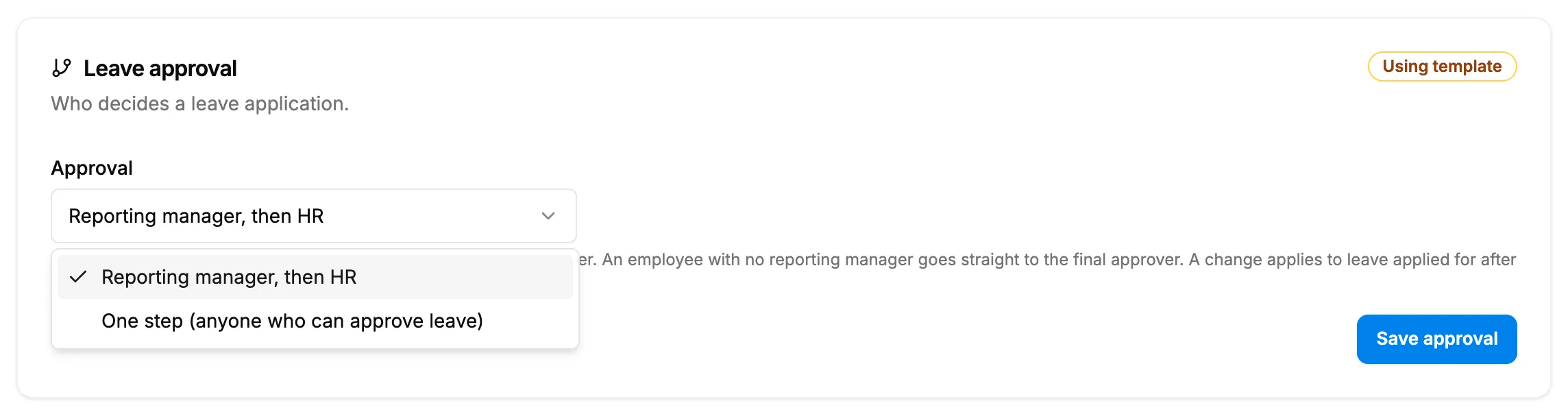
Step 2. The Leave approval section with the Approval choice and its help text. -
Select Save approval.
Set the leave rules
- Go to the section Leave rules: "How a leave's days are counted, and when it may be applied for."
- Set the rules:
- Sandwich rule: "Weekly offs and holidays between two leave days count as leave (a Friday and a Monday off make four days). Template: off."
- Leave may be applied for past dates: "Useful while entering history, or for sick leave reported after the day. Template: yes."
- Minimum notice for planned leave (days): 0 to 90. "0 means none (the template). Applies to the leave types marked "needs notice"."
- Select Save leave rules.
Result
The message "Saved" shows and the section badge reads "Saved [time]".
- A new approval choice applies to leave applied for after it. Applications already waiting keep their steps. See How a leave application moves from Submitted to Approved.
- The leave rules apply to new applications. See Apply for leave.
To let someone decide leave, give them Can approve leave (first step, or the only step) or Can give final approval of leave on their role or on the person. See Change what a role can do and Give one person different permissions from their role. The reporting manager is set on each employee. See Set the reporting manager.
If something is different
- An employee has no reporting manager: the first step reads "Skipped: no reporting manager" and goes to the final step.
- Nobody else holds Can give final approval of leave: the final step reads "Skipped: no final approver configured", and the first step's approval is final.
- "Minimum notice is a whole number of days from 0 to 90": correct the number.
- No Leave approval or Leave rules section: you do not have Can change HRMS settings. See An HRMS page says only administrators can use it, or that I need a right.