
Before you start
- You need Can change HRMS settings. HR has it by default.
- Your company starts with four template types: Casual Leave (CL, 12 days), Sick Leave (SL, 12 days, no notice), Earned Leave (EL, 15 days, carry forward up to 30, no half day) and Unpaid Leave (LWP, unpaid).
Steps
Add a leave type
-
In the sidebar, select HRMS › HRMS settings. Go to the section Leave types: "The kinds of leave employees can apply for. Days per year empty means no limit; an unpaid type keeps no balance. A new or reactivated type gives every employee it applies to this leave year's balance."
-
In the empty row, fill in the type.
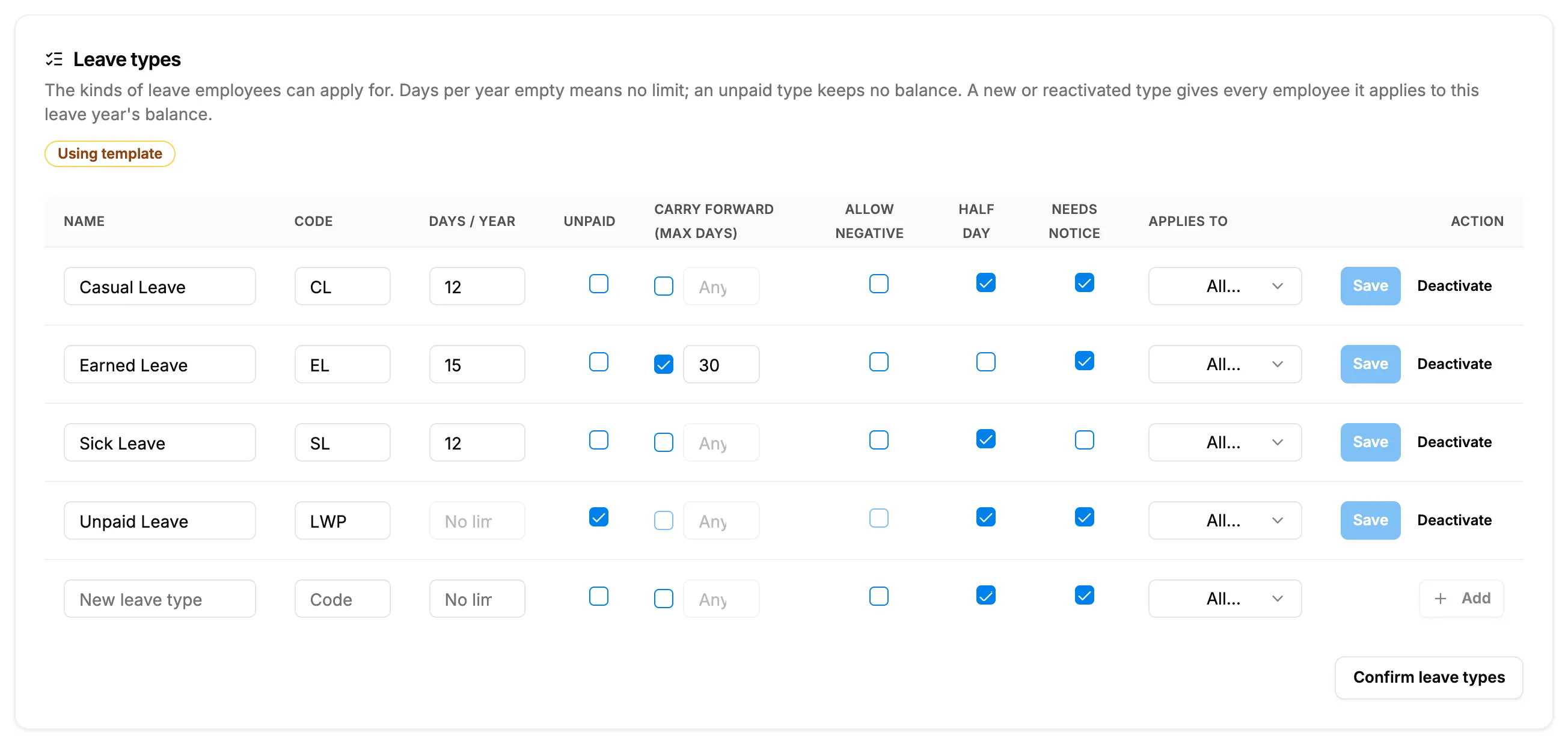
Step 2. The Leave types table with the template types and the empty row for a new type. Field Required What to enter Name Yes For example Casual Leave. Up to 100 characters. Code No Up to 10 characters, for example CL. Days / year No 0 to 366. Empty means No limit. Unpaid No Tick for an unpaid type. It clears and greys out the days, carry forward and Allow negative. Carry forward (max days) No Up to 366 days carried into the next leave year. Empty means Any. Allow negative No Tick or leave. Greyed out for an unpaid type. Half day No Tick to allow half days. Needs notice No Tick so the minimum notice in Leave rules applies. Applies to No All employees, Field staff (workers and technicians) or Office staff (everyone else). -
Select Add.
Change a leave type
- Change the values on the type's row.
- Select Save.
Deactivate or reactivate a leave type
- On the type's row, select Deactivate. The row shows the badge "Inactive". Past applications of the type stay.
- To use it again, select Reactivate.
Confirm the section
- When the types are right, select Confirm leave types.
Result
- Added: "Leave type created successfully". Every employee it applies to gets this leave year's balance, if it is paid with a yearly limit.
- Changed: "Leave type saved".
- Deactivated: "Leave type deactivated". Employees can no longer apply for it ("[type] is no longer offered.").
- Reactivated: "Leave type reactivated", and employees get their missing balances.
- Confirmed: "Leave types confirmed". The section counts as saved for HRMS setup.
If something is different
- "A name is required (100 characters or fewer).", "The code is 10 characters or fewer.", "Days per year must be a whole number from 0 to 366, or empty for no limit." or "The carry forward limit must be a whole number from 0 to 366, or empty for no limit.": correct the value.
- Unpaid leave and payroll: payroll finds leave without pay by the code LWP, or a name with "Unpaid" or "Without Pay", not by the Unpaid tick. Keep the code LWP on your unpaid type. See A payslip shows the wrong working or present days, or amounts in ₹.
- "Applies to" limits who sees the type: an employee applying for a type that is not theirs sees "[type] is for [group] only."
- No Leave types section: you do not have Can change HRMS settings.