
Before you start
- You are the Owner, an Admin, HR or a Manager, with HRMS Management. By default a Manager does not hold HRMS Management, so only Owner, Admin and HR can open the page.
- To decide a leave, the open step is yours (see Decide a leave request on Leave Requests).
- The attendance part needs your company's time zone to be confirmed.
Steps
-
In the sidebar, select HRMS › Manager Dashboard. The page says "Team overview and pending approvals".
-
Read the cards Total Employees and Pending Leaves, then today's counts Present today, Absent today, On leave today, Late today, Not marked today and Missing clock out.
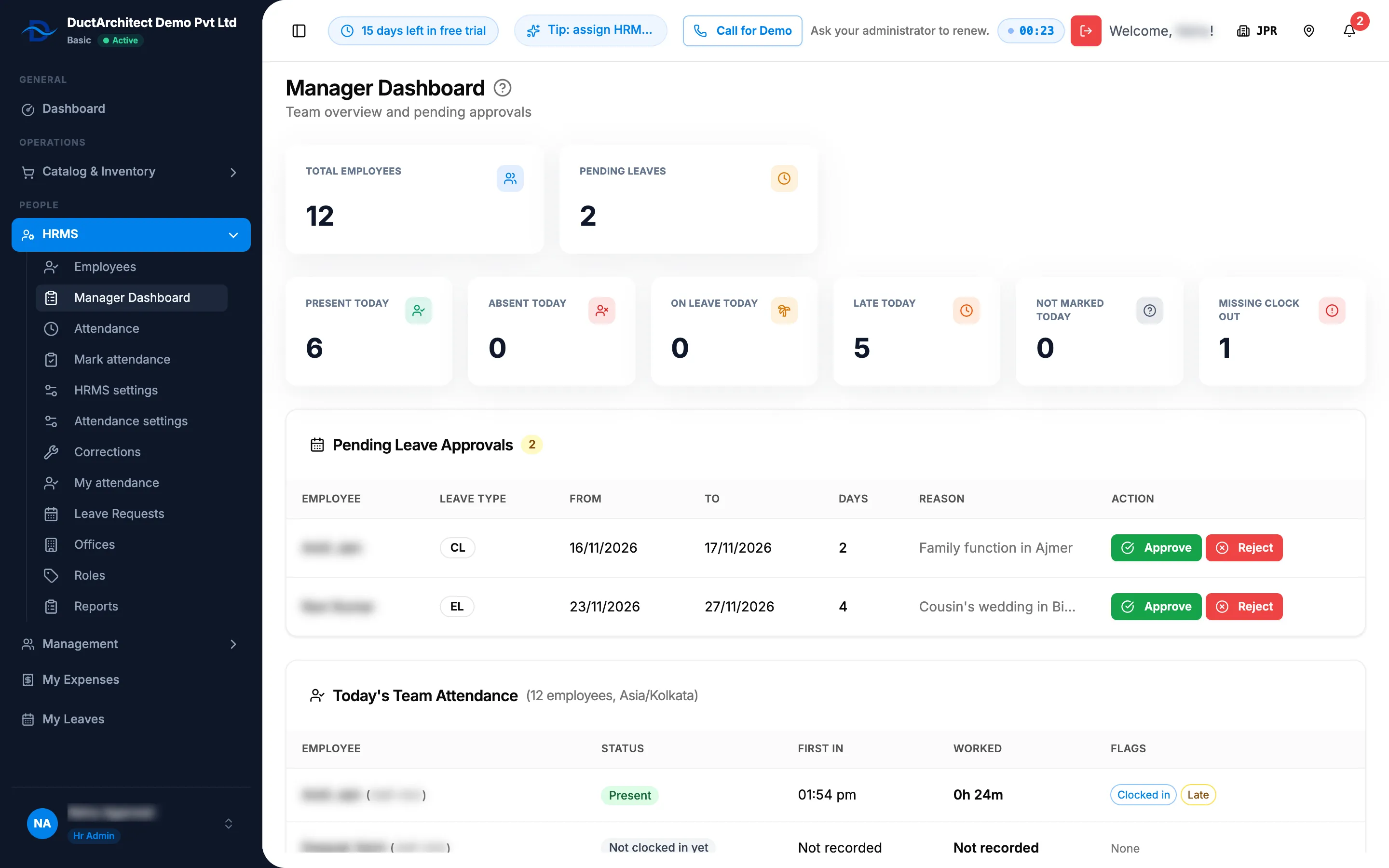
Step 2. The Manager Dashboard with its cards, Pending Leave Approvals and Today's Team Attendance. -
Read Today's Team Attendance "([number] employees, your direct reports, [timezone])": Employee, Status, First in, Worked and Flags. "your direct reports" shows when the list holds only the people who report to you.
Decide a pending leave
- In Pending Leave Approvals, find the leave: Employee, Leave Type (shown as its code, for example CL or EL), From, To, Days (½ for a half day) and Reason.
- In Action, select Approve or Reject. The box "Approve Leave Request" or "Reject Leave Request" shows Employee:, Leave:, Dates: and Reason:.
- In Action, keep or change the choice: Approve, Reject or Request Clarification.
- Fill in the text: Remarks (optional) to approve, Reason ("Why it is rejected") to reject, or What do you need clarified? ("Your question").
- Select Approve, Reject or Send.
Result
- Approve: "Leave application approved", or "Approved by the manager; waiting for final approval" when a final step is still open.
- Reject: "Leave application rejected". On an approved leave that has not started, rejecting cancels it: "Leave cancelled; [number] day(s) went back to the balance".
- Request Clarification: "Clarification requested". The leave stays waiting; the employee answers on My Leaves.
The leave leaves Pending Leave Approvals once no step is yours. See How a leave application moves from Submitted to Approved.
If something is different
- No Manager Dashboard in the sidebar, or Access Denied: you need HRMS Management and the Owner, Admin, HR or Manager role. See An HRMS page says only administrators can use it, or that I need a right.
- "No pending leave requests": nothing is waiting that you may see.
- "Set your timezone to start using attendance" instead of the counts: see Attendance says "Set your timezone to start using attendance".
- "Give a reason for the rejection." or "Write what you need clarified.": fill in the text.
- "No employees to show for today", or a refusal text in the team card: nobody is listed for you today.
- The decision is refused: see I can't approve, reject or cancel a leave.
- A plan box opens: your plan is not active. See Every page sends me to Plans & Pricing.