
Before you start
- You need Can change HRMS settings. HR has it by default.
- Your leave types have their days per year and carry forward limits. See Set up leave types.
Steps
Set the leave year
- In the sidebar, select HRMS › HRMS settings, or select the HRMS card on Settings. "HRMS settings" opens.
- In the section Leave year ("The month a leave year starts. Balances, carry forward and the yearly allowance follow it."), choose Leave year starts in. The help says "Template: January." and may suggest a month for your country, for example April for India: "Suggested for [country]: [month]; confirm it by saving."
- Check the line "Current leave year: [label]".
- Select Save leave year.
Open the next leave year
-
In the Leave year section, select Open leave year [year]. The box says "A dry run: nothing is created until you confirm. Existing balances of the year are never changed."
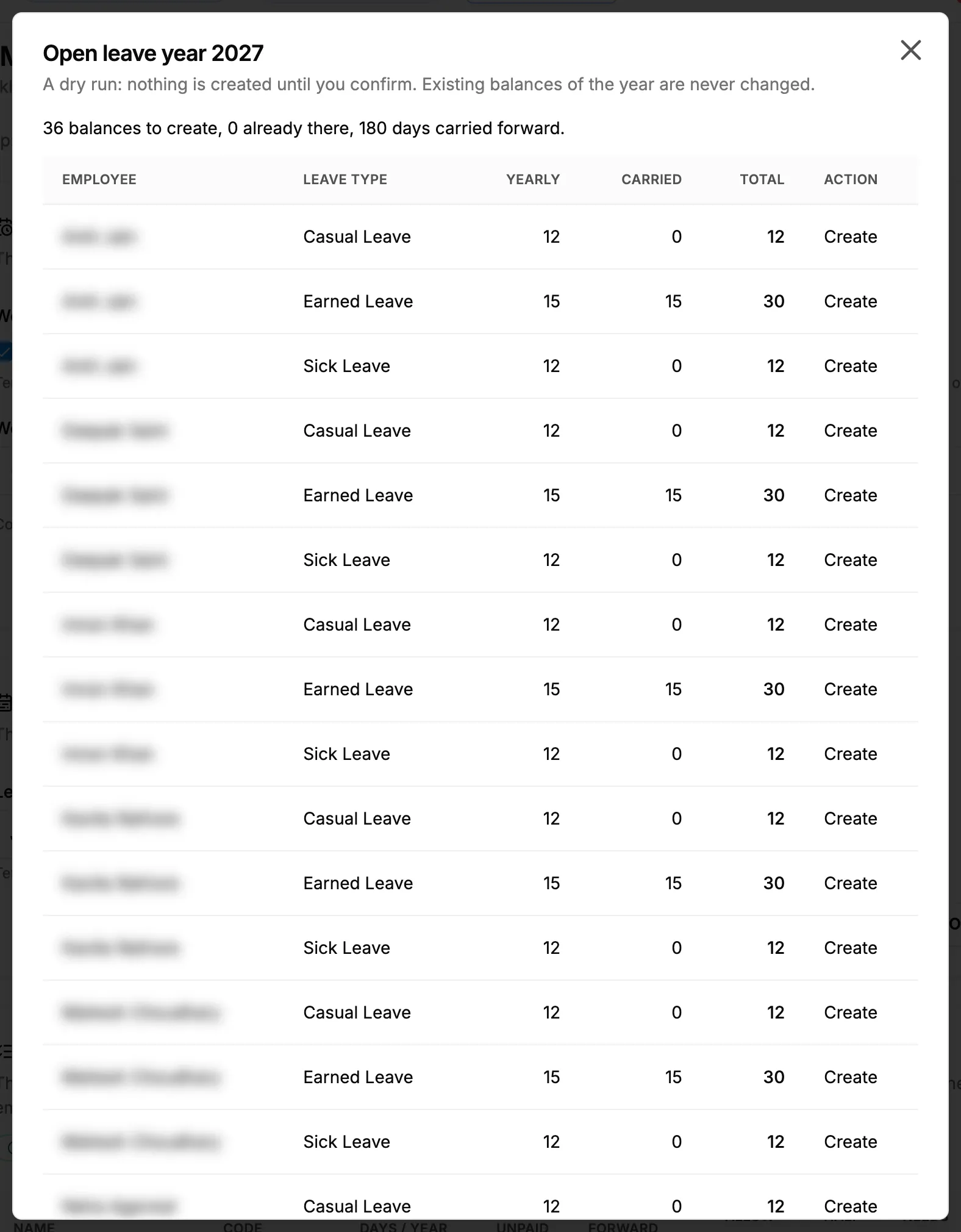
Step 1. The Open leave year box with the dry run summary and the table of balances. -
Read the summary "[number] balance(s) to create, [number] already there, [number] day(s) carried forward.", and the table: Employee, Leave type, Yearly, Carried, Total and Action ("Create" or "Already there").
-
Select Create [number] balance(s).
Result
- Leave year saved: the message "Saved" shows, and the section badge reads "Saved [time]".
- Next year opened: "[number] balance(s) created for [label]." Every working employee has the new year's balance of each paid leave type with a yearly limit, with days carried forward up to each type's limit. Balances that were already there are not changed.
See How leave balances are given, used and carried forward.
If something is different
- "You do not have the right to change HRMS settings or manage holidays.": see An HRMS page says only administrators can use it, or that I need a right.
- "No working employee has a paid leave type with a yearly limit.": add days per year to a paid leave type first.
- No Open leave year button in HRMS setup: the walkthrough's Leave year step hides it. Use Settings › HRMS.
- The section shows "Using template": it has not been saved yet. Save it once.