
Before you start
- You need Accounts Management. To export, also Can export lists.
- Fix the reason first where it needs a setting, for example an expense category with no account head. See Not posted: every reason and what to do.
Steps
Retry documents that are not posted
-
In the sidebar, select Accounts › Not Posted. The Not posted tab lists the documents with no voucher, with Type, Number, Date, Party, Amount and Reason.
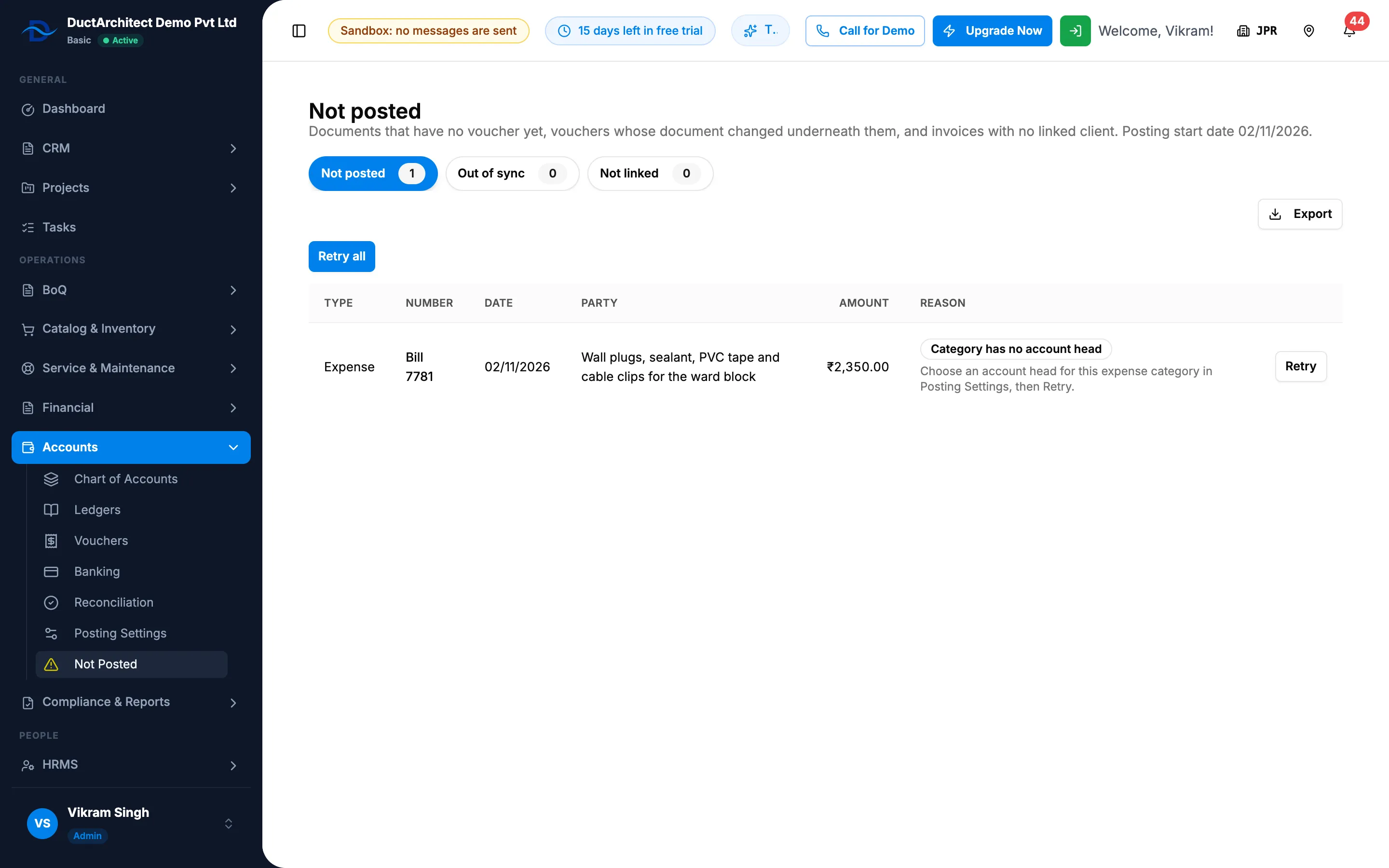
Step 1. The Not posted tab with the reasons and the Retry buttons. -
Read each row's Reason and fix it where you can.
-
Select Retry on the row. Or select Retry all to retry every row that can be retried.
Retry shows only for Pending, Account mapping missing, Category has no account head and Posting failed.
Resync vouchers that are out of sync
- Select the Out of sync tab. Each row shows the Voucher, Type, Document, Problem, Voucher amount and Document amount.
- Select Resync on the row.
Resync posts the voucher again from its document. When the document is gone, or a draft, cancelled or deleted, the voucher is cancelled.
Link an invoice to a client
- Select the Not linked tab. These invoices post to "Customers (not linked)".
- In the row's Client picker, choose the client. Clients with the same name come first, marked " (same name)"; when exactly one matches, it is chosen already.
- Select Link to client.
The invoice's own client details are not changed.
Export a tab
- On the tab, select Export, then Export Excel or Export PDF.
Result
- Retry: "Retried: [outcome]" shows, with the reason when it is still not posted. A posted document leaves the list. Retry all shows "Retried".
- Resync: "Resynced: [outcome]". The row leaves the tab when the voucher matches.
- Link to client: "Linked. The invoice's vouchers now post to that client's ledger." A customer head for the client is added under Sundry Debtors the first time.
- Each action is written to your company's activity log. See View the activity and access logs.
When the lists are clear, the tabs read "Everything dated from the start date is posted.", "Every system voucher matches its document." and "Every issued invoice is linked to a client." Next: Import a Tally export file, if your company moves its books from Tally.
If something is different
- No Retry on a row: its reason cannot be retried. See Not posted: every reason and what to do.
- The outcome reads in short words such as "skipped", "unchanged" or "out_of_sync": these are the stored outcome words. "skipped (account mapping missing)" means the reason is still there.
- The subtitle says "Automatic posting is not set up for this company.": turn posting on first. See Turn on automatic posting.
- The client is not in the picker: add the client first. See Add a client.
- The sidebar shows no count: the count of documents that need attention shows only on Vouchers and Financial Statements.
- The sidebar says "Not Posted" and the page "Not posted": they are the same page.