
Before you start
- You need Accounts Management.
- To add a head, your company's plan is active and within its Accounts limit.
- The account group exists. See Add, edit or delete an account group.
Steps
Add a head
-
In the sidebar, select Accounts › Chart of Accounts.
-
On the group's card, select Add Head. "Create Account Head" opens with that group chosen.
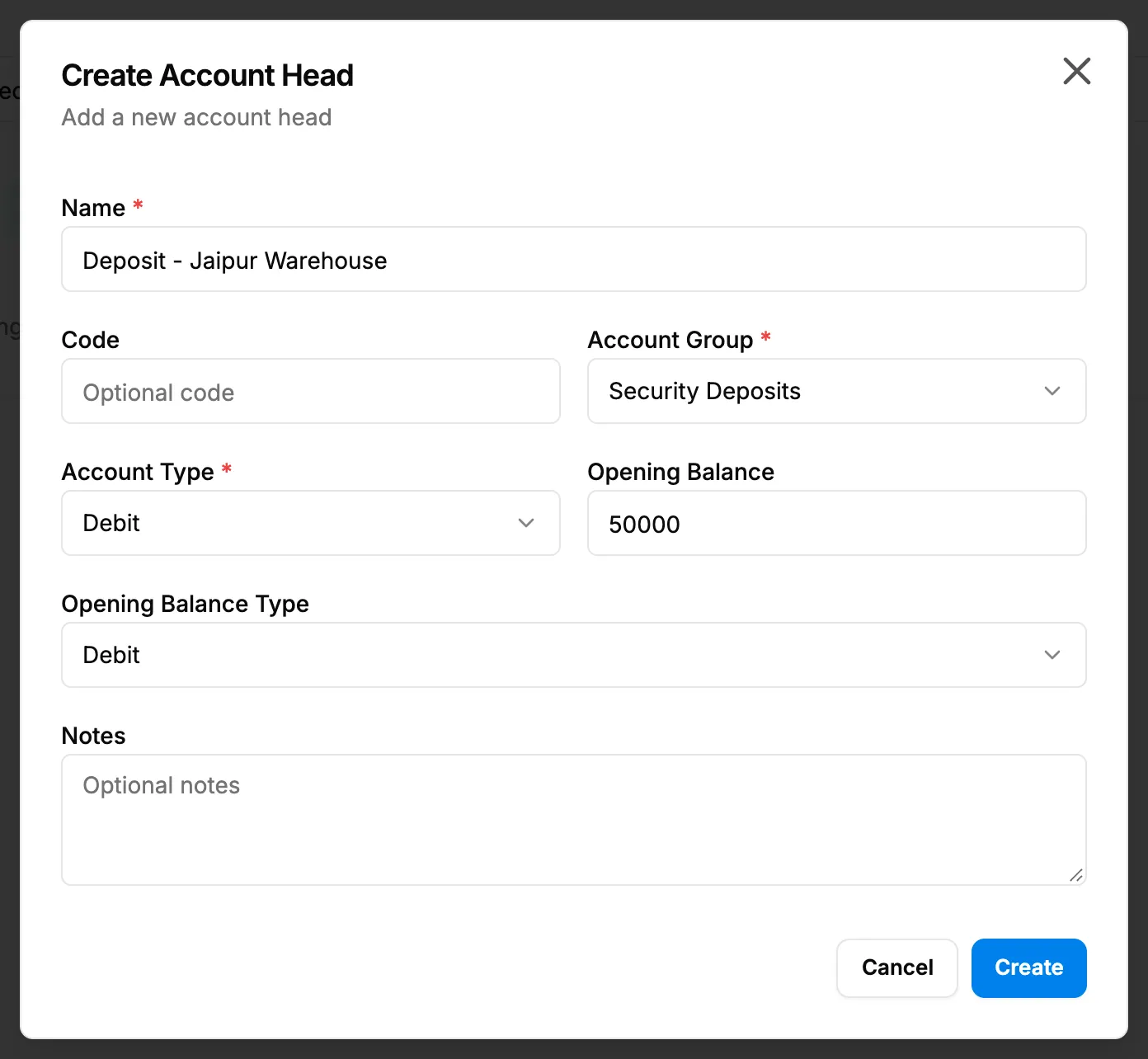
Step 2. The Create Account Head box with the group chosen and the opening balance fields. -
Fill in the head:
Field Required What to enter Name Yes 2 to 100 characters, for example Cash. Code No Up to 20 characters. Each code can be used once. Account Group Yes The group it sits in. Lists every group of your company. Account Type Yes Debit or Credit. Starts on Debit. Opening Balance No The balance on the day your books start. Starts at 0. Opening Balance Type Yes Debit or Credit. Follows the Account Type. Notes No Up to 500 characters. -
Select Create.
For a bank account, enter its opening balance here, on its own head under Cash and Bank. The bank account itself has no opening balance field.
Edit a head
- On the head's row, select the edit button (pencil). "Edit Account Head" opens.
- Change the fields and select Update.
Delete a head
- On the head's row, select delete. "Delete Account Head" asks: "Are you sure you want to delete "[name]"? It will be removed from all lists and reports; the record is kept."
- Select Delete. To keep it, select Cancel.
A deleted head's code can be used again.
Result
- Add: the message "Account head created successfully" shows. The head is listed in its group with its name, code and account type. Next: Create ledgers, search and export them.
- Edit: "Account head updated successfully". Statements and balances use the new opening balance.
- Delete: "Account head deleted successfully".
If something is different
- "A 'debit' account must have a 'debit' opening balance, or an opening balance of 0." and Save is greyed out: set Opening Balance Type to the same side as Account Type, or leave the balance at 0.
- Account Type is greyed out with "Account type cannot be changed because this head has existing transactions.": the head already has voucher entries.
- "Cannot delete account head because it is associated with [reasons]": the head has voucher entries, a bank account or a ledger. See An account group or head cannot be edited or deleted.
- No delete, or "Cannot modify system account head": the head was added by DuctArchitect, for example by automatic posting. It cannot be changed or deleted, even though the pencil shows.
- "Account head code already exists": choose another code.
- The head shows an "Inactive" badge: no screen changes it.
- A plan box opens on Add Head: see Every page sends me to Plans & Pricing.