
Before you start
- You need Accounts Management.
- The account head exists. A customer or supplier head is added by automatic posting.
Steps
-
In the sidebar, select Accounts › Ledgers and select Statement on the head's row. Or, on Accounts › Chart of Accounts, select the statement icon on the head. The statement is not in the sidebar.
-
The page "Account statement: [head name]" opens on the financial year your company's today falls in.
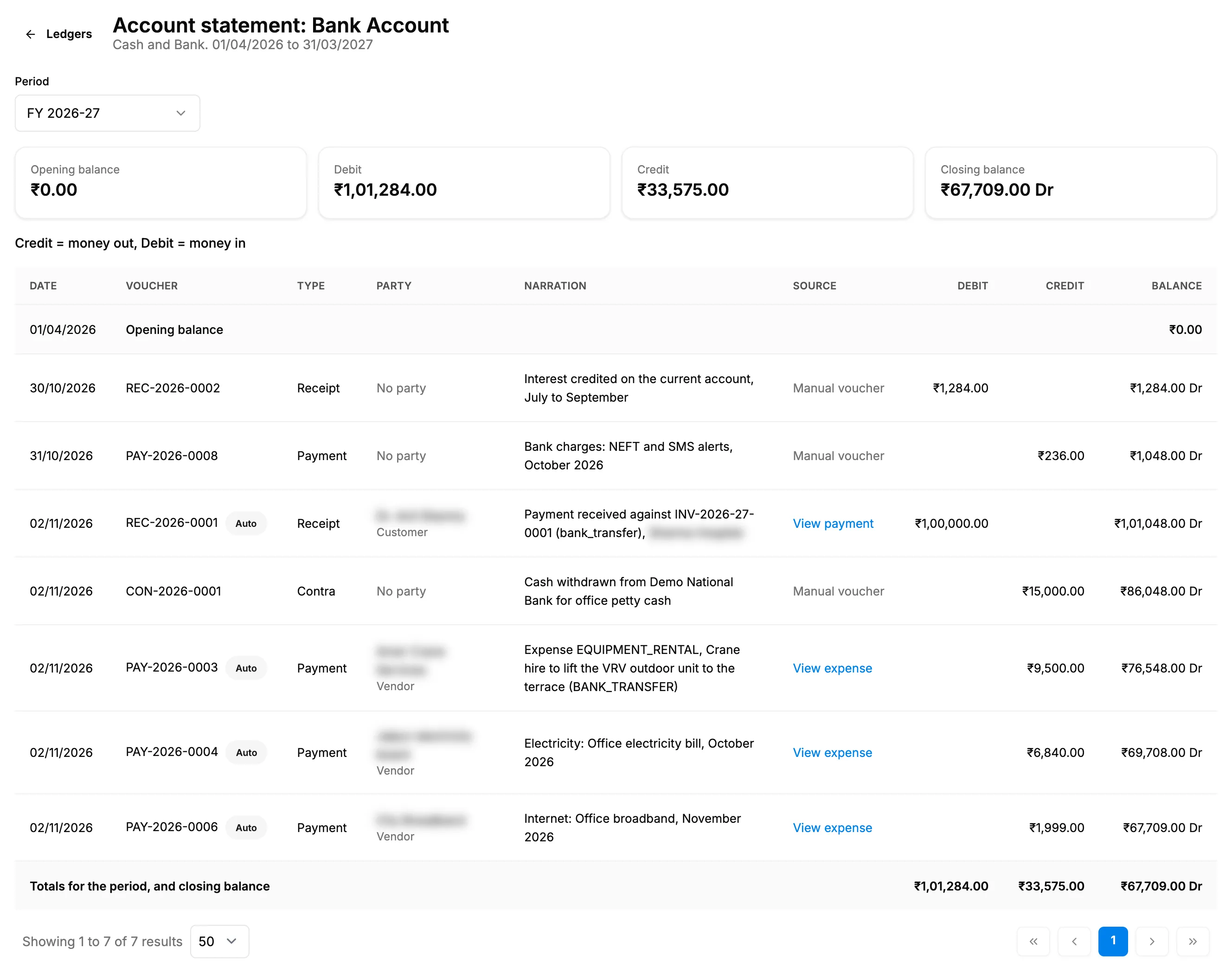
Step 2. An account statement with the Period select, the four balance cards and the entries. -
In Period, choose a financial year, Date range or All dates. For Date range, choose the From and To dates.
-
Read the cards: Opening balance, Debit, Credit and Closing balance, each with Dr or Cr.
-
Read the entries, oldest first. The first row is "Opening balance"; the last row on the last page is "Totals for the period, and closing balance". 50 rows show per page.
-
To open a line's document, select its Source link: View invoice, View payment, View credit note, View expense, View purchase order or View posting settings. A line you entered by hand reads "Manual voucher".
-
Select Ledgers to go back.
| Column | What it shows |
|---|---|
| Date | The voucher date |
| Voucher | The voucher number, with Auto for vouchers posted automatically |
| Type | The voucher type |
| Party | The customer, supplier or vendor, or "No party". A supplier's name opens the supplier. |
| Narration | The voucher's text |
| Source | The document the voucher came from, or "Manual voucher" |
| Debit, Credit, Balance | The amounts and the running balance after the line |
Result
You see every approved entry on the head in the period, with the balance after each line. Drafts, cancelled and deleted vouchers are not listed. The statement is read only and has no export. For a supplier, compare it with the Supplier Ledger: see The Supplier Ledger says it differs from Accounts.
If something is different
- "No entries in this period.": no approved voucher on this head falls in the period. Choose All dates.
- "The start date is after the end date": the From date is after the To date.
- A cash or bank head: the page shows "Credit = money out, Debit = money in".
- "The opening balance includes the opening balance journal [number] ([amount]), dated the first day of this period.": the opening balance journal from automatic posting is folded into the opening balance.
- An amber line about a bank account's opening balance: see A bank balance or opening balance looks wrong.
- The financial years in Period: they come from your company's financial years, or from the financial year start month set in Settings. See Set date, number and financial year formats.
- "Failed to load the statement": reload the page. If it stays, submit a request.