
Before you start
- You are the Owner or an Admin, with Accounts Management.
- Automatic posting is on. See Turn on automatic posting.
- Decide the From date. Every eligible document dated on or after it is posted, and the posting start date moves to it.
- If you entered any of these documents by hand as vouchers, they would be counted twice. Check your own vouchers for the period first.
Steps
-
In the sidebar, select Accounts › Posting Settings and find the Bring in earlier records card: "Posts invoices, payments, credit notes, refunds, expenses, receipts, returns and PO payments dated on or after a date you choose, oldest first. Preview first; nothing is written until you confirm. Documents are never changed, only vouchers are created."
-
Choose the From date. It starts on the first day of your active financial year, or of this financial year by your financial year start month.
-
Select Preview.
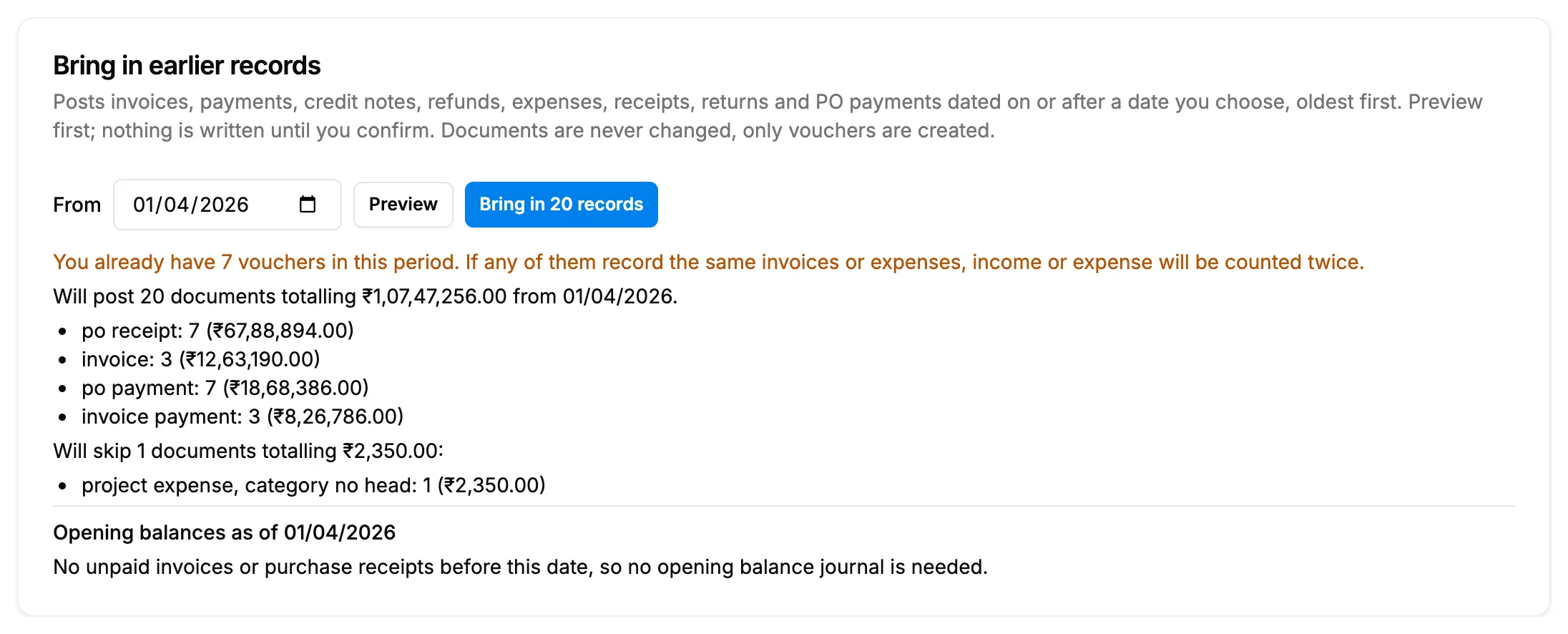
Step 3. The preview with what will post, what is skipped and the opening balances. -
Read the preview:
- First, a warning if you already have vouchers in the period: "If any of them record the same invoices or expenses, income or expense will be counted twice."
- "Will post [number] documents totalling [amount] from [date].", then a line for each document type with its count and amount.
- "[number] invoice(s) will post to Customers (not linked)."
- "Will skip [number] documents totalling [amount]:" with each reason.
- "Opening balances as of [date]": the journal each customer and supplier ledger opens with, or "No unpaid invoices or purchase receipts before this date, so no opening balance journal is needed."
-
If Also post the opening balance journal shows, tick it only if the opening balances are not already in your books. The box warns: "This company already has vouchers of its own. Receivables or payables you entered by hand would be counted twice."
-
Select Bring in [number] records. "Bring in earlier records?" asks: "The posting start date moves to [date] and every eligible document from that date is posted, oldest first."
-
Select Bring in. To stop, select Cancel.
-
Wait on the page. It shows "Posting [done] of [total] documents. This can take a few minutes; the page updates on its own."
Result
"Backfill started. This page shows its progress." shows, then "Backfill done: [posted] posted, [skipped] skipped, [failed] failed." The card sums it up: "Done from [date]: [posted] posted, [skipped] skipped, [failed] failed. Failures stay in the Not posted list." The posting start date is now the From date. The documents themselves are not changed. Next: Clear the Not posted list: retry, resync and link invoices to clients.
If something is different
- No Preview, or "Only an owner or admin can run a backfill": see Posting Settings cannot be changed.
- "Turn automatic posting on first": turn posting on first.
- "Preview failed": try again. If it stays, submit a request.
- The opening balance journal reads "Already posted as [number] dated [date].": with "It will be rewritten because the start date moves earlier." it is posted again for the new date; with "It stays as it is." it is kept.
- A party "left out, foreign currency" or "left out, this ledger already has an opening balance you entered": that party is not in the opening balance journal.
- The progress view is gone: the vouchers already written stay. Run Bring in earlier records again with the same date to finish the rest.
- The date in the question reads like 2026-04-01, and skipped items read like "po receipt, foreign currency": the box shows the stored words. It is the same date and the same reasons as on Not Posted.