
Before you start
- You need Accounts Management and View on Accounts vouchers to open Banking. To add, your company's plan is active and within its Accounts limit.
- An account head under the Cash and Bank group exists for this bank account, with the account's opening balance on it. Give each bank account its own head. See Add, edit or delete an account head.
Steps
Add a bank account
-
In the sidebar, select Accounts › Banking. The page reads "Manage bank accounts and transactions."
-
Select Add Bank Account. "New Bank Account" opens: "Add a new bank account".
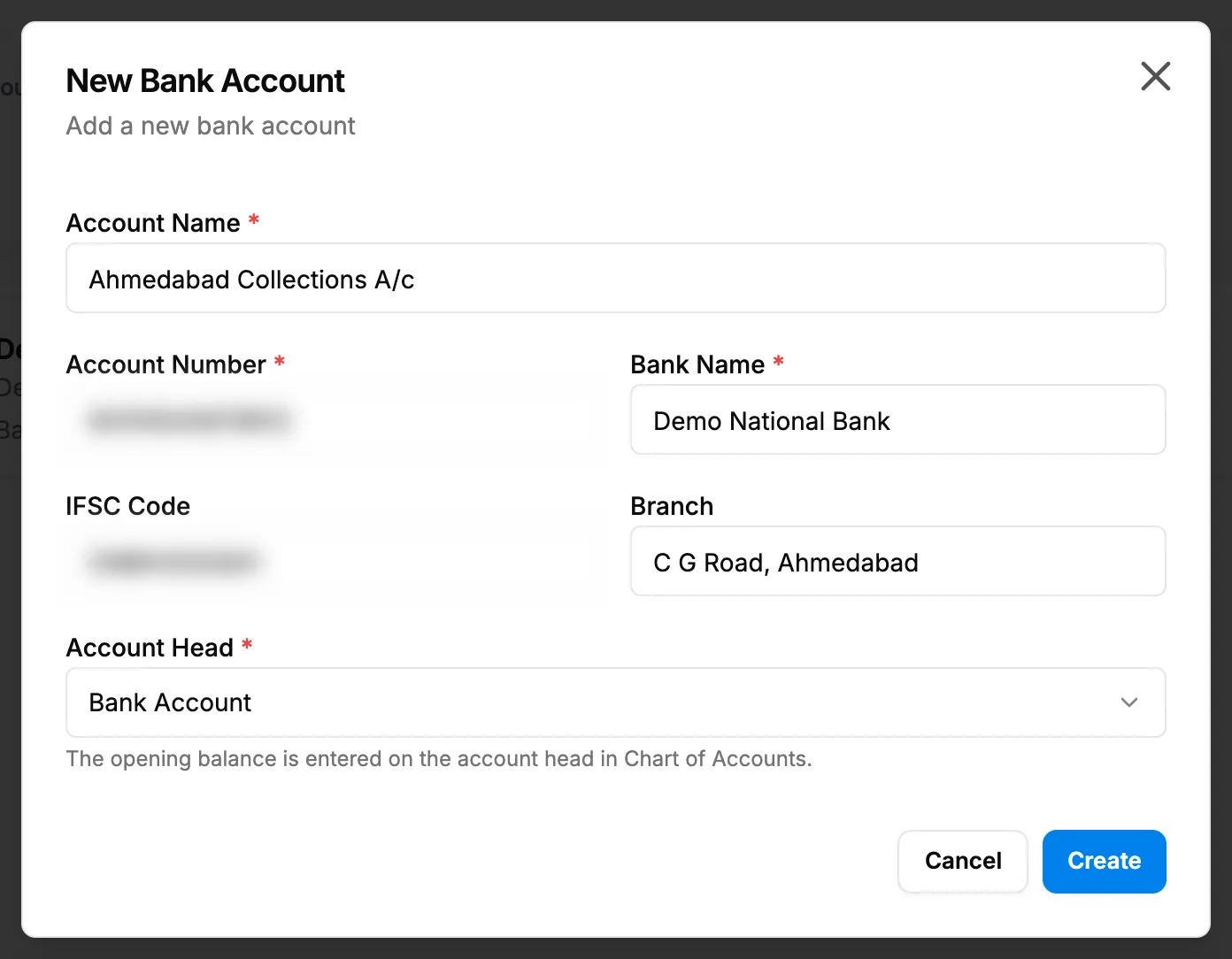
Step 2. The New Bank Account box with the bank details and the Account Head picker. -
Fill in the bank account:
Field Required What to enter Account Name Yes Your name for it, for example Main Current Account. Account Number Yes The bank account number. Each number can be used once. Bank Name Yes The bank. IFSC Code No 11 characters: 4 letters, 0, then 6 letters or digits, for example SBIN0001234. Branch No The bank branch. Account Head Yes Its account head. Lists the heads under Cash and Bank. -
Select Create.
There is no opening balance field: "The opening balance is entered on the account head in Chart of Accounts."
Edit a bank account
- On the bank account's card, select edit (pencil). "Edit Bank Account" opens.
- Change the fields and select Update.
Delete a bank account
- On the card, select delete (bin). "Delete Bank Account" asks: "Are you sure you want to delete the bank account "[name]"? It will be removed from all lists and reports; the record is kept."
- Select Delete. To keep it, select Cancel.
Result
- Add: the message "Bank account created successfully" shows. The card shows the name, "Active", the bank and account number, the IFSC, and Balance: the head's opening balance plus every entry on the head. Next: Add a bank transaction or Reconcile a bank account.
- Edit: "Bank account updated successfully".
- Delete: "Bank account deleted successfully".
If something is different
- Banking is missing or refused: you need View on Accounts vouchers. See Accounts or Compliance & Reports is missing, or an Accounts page is refused.
- No head in Account Head: add a head under the Cash and Bank group first.
- "A bank account can be linked only to an account head under Cash and Bank.", an IFSC message, or "A record with this account number already exists": see Banking refuses a bank account or a bank transaction.
- "Cannot delete bank account because it is associated with [number] transaction(s), and [number] reconciliation(s).": a bank account with transactions or reconciliations cannot be deleted.
- An older head shows "(outside Cash and Bank)": choose a head under Cash and Bank, or the balance cannot match the statement. See A bank balance or opening balance looks wrong.
- A plan box opens: see Every page sends me to Plans & Pricing.