
Before you start
- To issue: Inventory Management and Add on Stock outs. To order: Purchase Orders and Add on Purchase orders (by default only Owner and Admin).
- The request is Approved, Partially approved or Partially fulfilled.
- The line is approved, has an Open quantity above 0, and names a catalog item. A line that says "Not in the catalog" needs its item first. See Pick or create the catalog item for a request line.
Steps
Issue from stock
-
Open the request. See Find, open and export material requests.
-
On the line, under Fulfil, select Issue. The stock out form for the request's project, contract or visit opens with the item and the line's open quantity filled in.
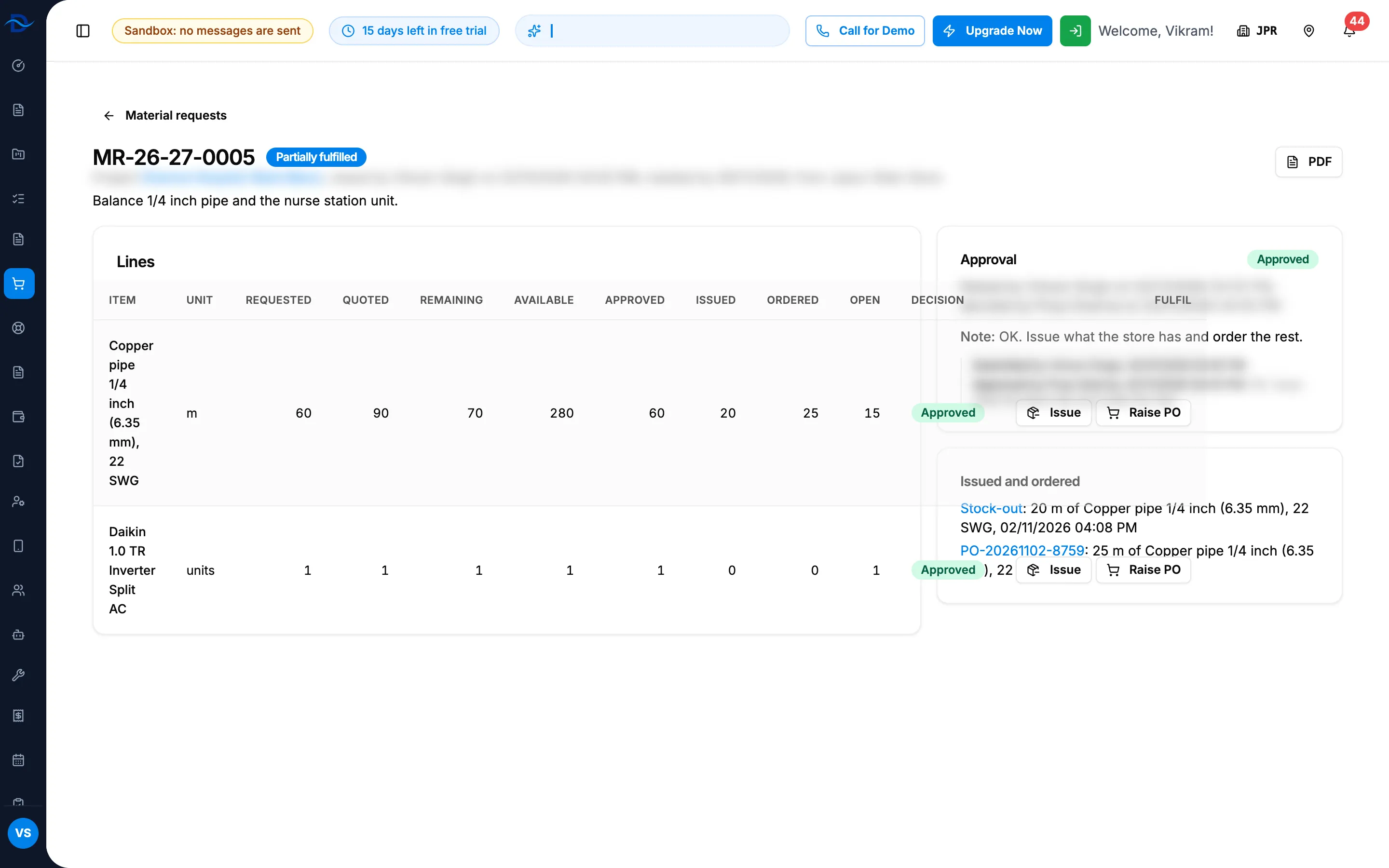
Step 2. An approved request line with Issue and Raise PO under Fulfil, and its Open quantity. -
Complete the stock out: the warehouse, the quantity (up to the open quantity) and any serial numbers. For a project see Issue stock to a project; for a service contract or visit see Issue stock for a service contract or visit.
-
Save the stock out.
Raise a purchase order
- Open the request.
- On the line, under Fulfil, select Raise PO. "Add Purchase Order" opens with the item and the line's open quantity.
- Choose the supplier, check the price and tax, and save the order. See Create a purchase order.
Result
The request's page shows the new figures:
- After a stock out, the line's Issued goes up, and Issued and ordered lists "[challan number or Stock-out]: [quantity] [unit] of [item], [date and time]".
- After a purchase order, the line's Ordered goes up, and Issued and ordered lists "[PO number]: [quantity] [unit] of [item] ([purchase order status])".
- Open goes down by the same amount.
The request reads Partially fulfilled while some approved quantity is still open, and Fulfilled when nothing is. The person who raised it is told; for a purchase order the message links to it.
Issuing and ordering do not need to wait for each other: you can issue part from stock and order the rest.
If something is different
- No Issue or Raise PO on a line: the line is not approved, has nothing open, or has no catalog item; or you do not have Add on Stock outs or Purchase orders. See Issue or Raise PO is missing or refused.
- Raise PO opens Access Denied: the purchase order page needs Purchase Orders, which a Manager does not hold by default. Ask an Owner or Admin to raise the order.
- "This would exceed the approved quantity: ...": the quantity is above what is still open on the line. Lower it. See Issue or Raise PO is missing or refused.
- "MR-... is charged to another project" (or another service contract, or another service visit): the stock out was changed to another project, contract or visit. Issue it to the request's own one.
- Stock that was issued comes back: returned quantities are taken off Issued, and the line is open again. See Return issued items to inventory.
- A purchase order raised from the line is cancelled or deleted: it no longer counts as ordered, and the line is open again.