
Before you start
- You need Operation Management and Edit on Duct and load calculations.
- The space is calculated, inside a project. See Calculate the heat load for a project.
- To pick from a list, your inventory has AC-system items with a TR capacity. See Set the equipment type and capacity of AC units.
Steps
-
On the space's results, find the card "ROOM UNIT, SIZED ON THIS SPACE". When units are already assigned to the space, it shows "Assigned in System Type Recommendation: [unit] x [quantity]".
-
In Choose unit, pick a unit from your inventory.
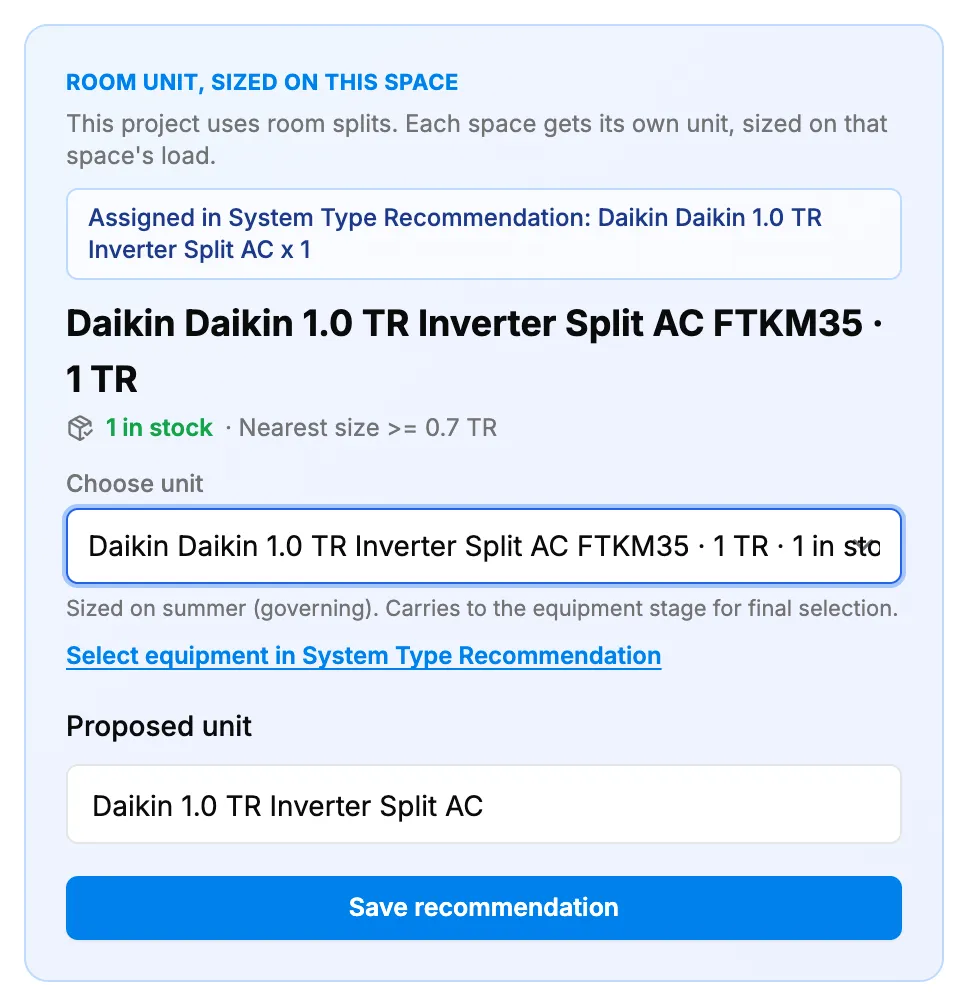
Step 2. The room unit card with Choose unit and Proposed unit. -
Or type the unit's model in Proposed unit.
-
For a VRF system, fill in Sel HP, Total HP, IDU HP and ODU HP.
-
Select Save recommendation.
Result
The unit is saved with the space. It feeds the project's AC system selection. See How AC unit recommendations work. To choose the project's equipment, select Select equipment in System Type Recommendation under Choose unit. See Open AC Unit Recommendations for a project.
If something is different
- "No AC-system inventory items with a TR capacity were found. Enter the unit below, it saves with the space and feeds the equipment stage.": type the unit in Proposed unit. To pick from a list later, add AC-system items with a TR capacity to your inventory.
- "The inventory list could not be loaded. Enter the unit below, it saves with the space and feeds the equipment stage.": type the unit in Proposed unit, or reload the page.
- No VRF fields: they show only for a VRF system.
- On the standalone calculator: nothing is saved. See My heat load results were not saved.