
Before you start
- You need Enquiry Management and Edit on Enquiries.
- The enquiry is not Converted. A converted enquiry's badges cannot be selected.
Steps
Change the status
-
In the sidebar, select CRM › Enquiries.
-
On the enquiry's row, select the badge in Status. A menu lists the other statuses: New, In Progress, Quoted and Cancelled.
-
Choose the new status. The box "Change Enquiry Status" asks "Change status of [number] from [old] to [new]?".
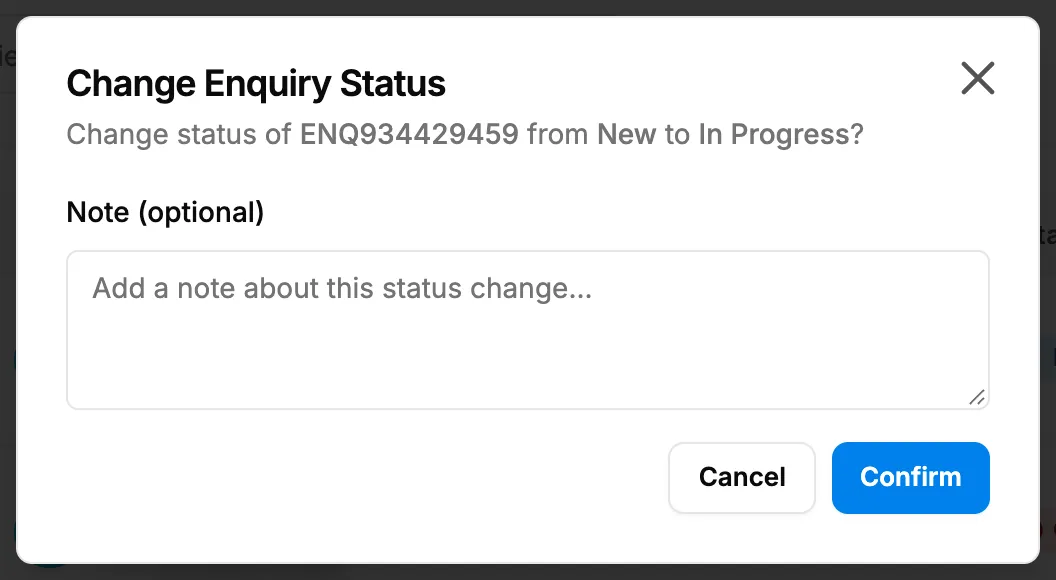
Step 3. The Change Enquiry Status box with the optional note. -
Optional: in Note (optional), write why the status is changing. Up to 1000 characters.
-
Select Confirm.
Change the priority
- In the sidebar, select CRM › Enquiries.
- On the enquiry's row, select the badge in Priority and choose the new priority: Low, Medium, High or Urgent.
- The box "Change Enquiry Priority" asks "Change priority of [number] from [old] to [new]?".
- Optional: in Note (optional), write why. Up to 1000 characters.
- Select Confirm.
Result
Change the status: the message "Status updated" shows, and the row's badge shows the new status. The note is kept in the activity log, not on the enquiry. A Cancelled enquiry can no longer be edited, and Generate Quotation and Convert to Project are hidden. To reopen it, change its status again here. See How an enquiry moves from New to Converted.
Change the priority: the message "Priority updated" shows. The list shows Low in green, Medium in yellow, High in orange and Urgent in red.
If something is different
- "You do not have permission to do this.": you do not have Edit on Enquiries.
- The badge cannot be selected, "Cannot change status of a converted enquiry" or "Cannot change priority of a converted enquiry": the enquiry is converted. See An enquiry's status or priority cannot be changed.
- Converted is not in the menu: an enquiry becomes Converted when a project is made from it. See Start a project from an enquiry.
- "Enquiry is already in this status": pick a different status.
- "Failed to update status" or "Failed to update priority": try again.
- You are on the enquiry's page: use the list, or select Edit and change the Status and Priority fields. See Edit an enquiry, assign it or set a follow-up date.